Handle API Errors by Response Status in Actionflows
Demo Project
https://editor.momen.app/multi-client/tool/OO7KBLrL8oQ/7e07qbN2D64?code=9Xqkk8E5YUStR&ref=0562398
Introduction
- Goal: When an order ships, call a third-party logistics “create shipment” API and decide what happens next from the API’s response status, instead of treating every failure the same way.
- Use Cases: Any external call that can fail in ways that need different handling, such as shipping, payment gateways, SMS delivery, or identity verification (KYC).
- Core Logic:
- Group the API’s responses into several response statuses by status code. Each status has its own response body shape.
- The Call API node in an Actionflow exposes every response status as a field. Only the status that actually matched has a value; the others are empty.
- A Condition node checks which response status is not empty and runs the matching branch.
- Recoverable failures (rate limits, server errors) are retried inside the flow with a While loop and a Delay. Unrecoverable failures (bad request) go to manual handling.
The rules in this example:
| Response | Meaning | Handling |
|---|---|---|
| 2xx | Shipment created | Mark the order as shipped, store the tracking number, break out of the loop |
| 400, 401, 403, 404, 422 | The request itself is wrong, retrying will not help | Mark the order as needing manual handling, store the reason, break out of the loop |
| 429, 5xx | The provider is rate limiting or failing and may recover | Wait a few seconds and retry, up to three attempts in total |
| Anything else | A response arrived, but its status code is not listed in any response status, or the body is not JSON | Treated like a rate limit: wait and retry |
| Still failing after three attempts | Needs attention | Mark the order as pending retry and optionally throw an error |
Steps
The logistics API in this tutorial is simulated with the public test service postman-echo.com: requesting /status/{status code} returns that status code with a small JSON body. It only accepts GET. When you connect a real logistics provider, replace the URL, method, and request body according to its documentation. The rest of the logic stays the same.
Data Storage
Every data table in Momen already has the system fields id, created_at, and updated_at. The tables below list only the fields you need to add.
Enum: order_status
Create the enum first, then reference it from the table. Option names can only contain letters, digits, and underscores.
| Option | Meaning |
|---|---|
PENDING_SHIP | Waiting to be shipped |
SHIPPED | Shipped |
NEED_MANUAL | Needs manual handling |
PENDING_RETRY | Waiting to be retried |
Data Table: shop_order
| Field | Type | Note |
|---|---|---|
order_no | Text | Business order number. A unique constraint is recommended |
receiver_name | Text | Sent to the logistics API |
receiver_address | Text | Sent to the logistics API |
status | Enum (order_status) | Defaults to PENDING_SHIP |
tracking_no | Text | Returned by the provider. Can be empty |
fail_reason | Text | The reason for the latest failure. Can be empty |
attempt_count | Bigint | The number of API attempts made so far. Defaults to 0 |
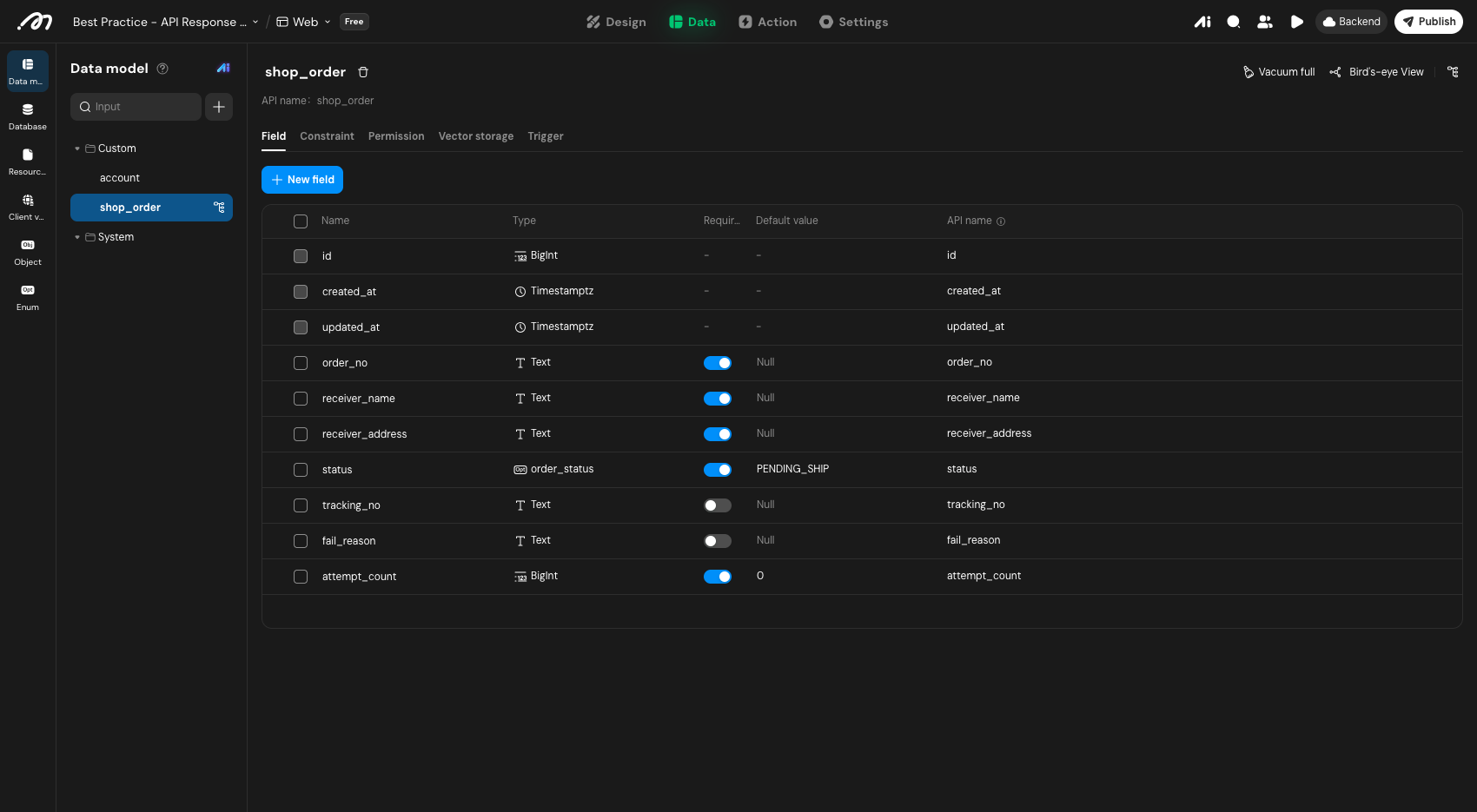
A newly created data table is fully readable and writable by both anonymous and logged-in users by default. Tighten this right after the data model is done. See Permissions.
Configure the API
Create the API
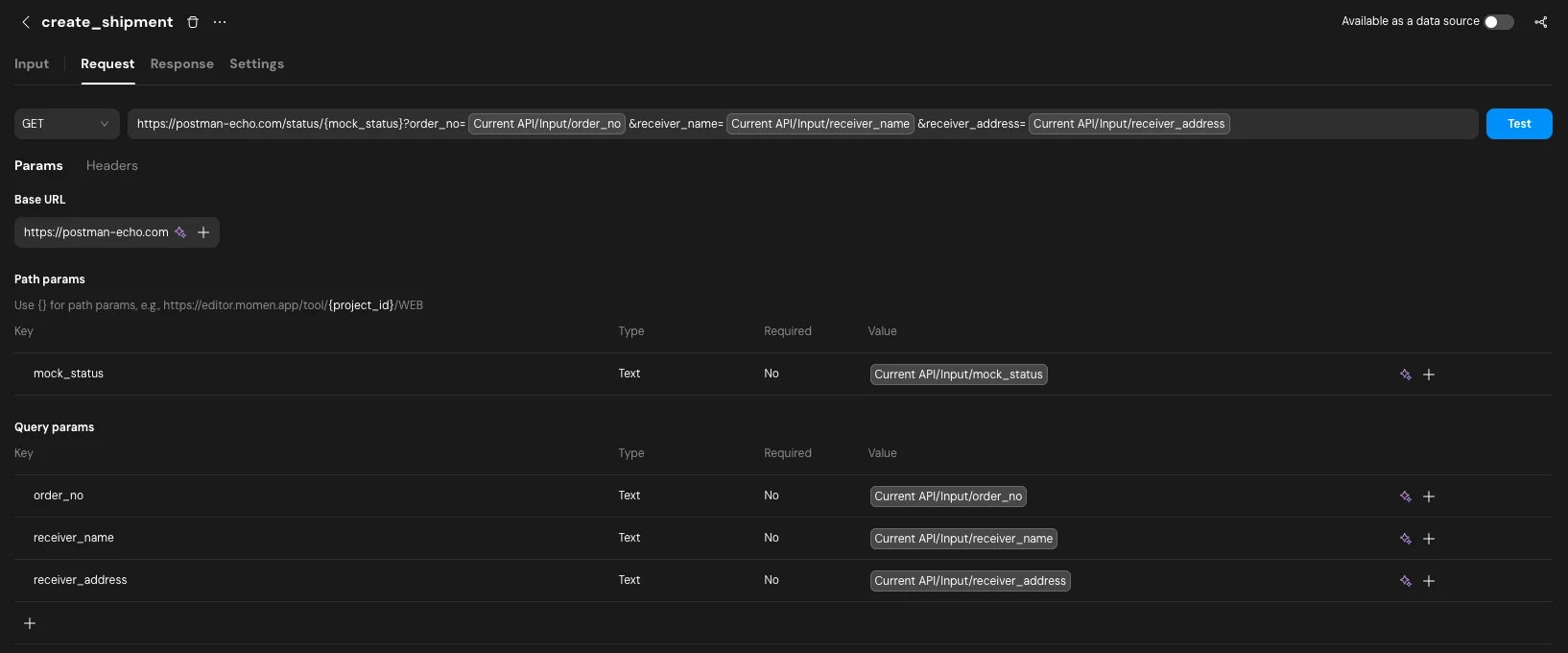
Create an API collection, then an API named create_shipment in it:
- Method and URL: follow the logistics provider’s documentation. For this tutorial, use
GETwith thepostman-echo.comURL/status/{status code}from the note above. - Input: declare the values the caller must pass, here the order number, receiver name, receiver address, and a simulated status code.
- Request: bind each input to a path parameter or query parameter.
Group Responses into Statuses
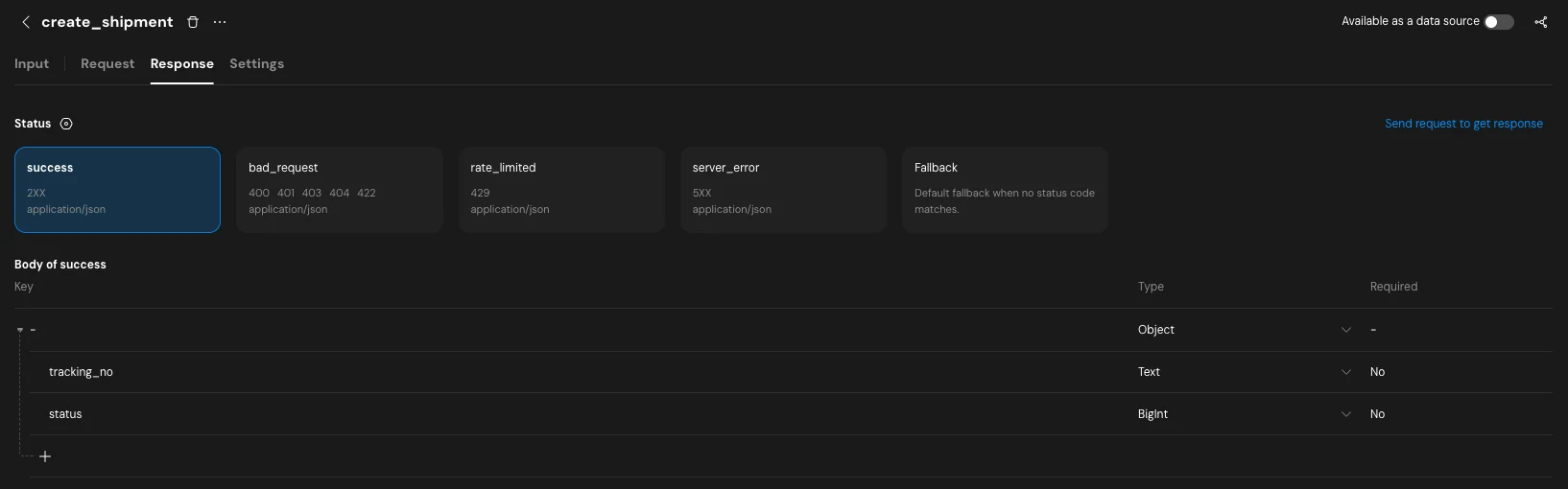
This is the key part of the whole approach. Open the Response tab, click the gear next to Status, and group the responses by how you want to handle them:
| Status name | Status codes | Body |
|---|---|---|
success | 2XX | Object with tracking_no |
bad_request | 400, 401, 403, 404, 422 | Object |
rate_limited | 429 | Object |
server_error | 5XX | Object |
Fallback | Built in, no configuration | Returned when no status above matches |
Things to know:
- A status name can only contain letters, digits, and underscores, cannot start with a digit, and cannot be
Fallback. - A status code is three characters, with a first digit from 1 to 5.
Xis a wildcard, so2XXmatches every code starting with 2. - In this example
429has to be handled differently from the other 4xx codes, sobad_requestcannot use4XX. It lists the 4xx codes explicitly instead. The reason is explained in 4XX and 429. - A status code that is not listed in any status falls through to
Fallback.
The response must be application/json, otherwise it always falls through to Fallback. When the runtime picks a response status, it compares the status code and also the Content-Type response header (ignoring parameters such as charset) with the type configured on the status, and a custom response status is always application/json. A text/plain or HTML response, or a response with no body and therefore no Content-Type, ends up in Fallback even when the status code matches exactly. Before connecting a new API, use the test panel to confirm that every status really returns JSON.
The echo service does not return a tracking number, so tracking_no stays empty in the demo. A real logistics provider returns one.
Give each response status an Object body instead of Text. Only an object type lets later nodes pick its fields when binding.
Match Order
When a response arrives, the runtime picks the response status in this order, and the first match wins:
- Exact match: the status code is written out exactly in a status, for example
429. - Wildcard match: the status code fits a pattern with
X, for example5XX. If several statuses match, the first one in the list wins. Fallback: nothing above matched.
Also note that a connection failure or a timeout never ends up in Fallback. No response was received, so the Call API node fails with an error and the Actionflow treats it as an error. If you also want to retry on timeouts, handle that separately in the Actionflow.
4XX and 429
This example needs to separate 429 (rate limited, worth retrying) from the other 4xx codes (bad request, not worth retrying). The natural idea is bad_request with 4XX and rate_limited with 429, but those two overlap, and the editor will not let you configure it:
| Where | What happens |
|---|---|
| Editor | The status code input rejects overlapping codes. With 4XX present you cannot add 429, and with 429 present you cannot add 4XX. |
| Other tools (for example MCP) | Newer versions also reject overlapping codes and report a duplicate. Older versions did not check, so an overlapping configuration may already exist in an older project. |
| Runtime | If an overlapping configuration does exist, the runtime does not raise an error: an exact match wins over a wildcard, so 429 hits rate_limited and the other 4xx codes hit bad_request. But that relies on a configuration the editor no longer accepts. |
So this example does not use 4XX. It lists the 4xx codes that should count as a bad request:
| Response status | Status codes | Result in testing |
|---|---|---|
bad_request | 400, 401, 403, 404, 422 | 404 and 422 hit it and the order goes to manual handling |
rate_limited | 429 | 429 hits it and the flow waits and retries |
Fallback | Built in | The unlisted 409 hits it and is handled as “other”: wait and retry |
A 4xx code that is not listed falls through to Fallback, not to bad_request. List every status code you care about. Which 4xx codes mean “retrying will not help” depends on the provider’s documentation.
Do not design an API around “an overlapping configuration still works at runtime”. Overlapping codes are rejected by newer editors and tools, and any later change to those response statuses may force you to fix the conflict first. Write non-overlapping configurations from the start.
Build the Actionflows
Actionflow 1: ship_order_with_retry
1. Basic setup
- Create an Actionflow named
ship_order_with_retryand set it to Asynchronous. The Delay node only works in asynchronous Actionflows. - Inputs:
order_id(Bigint, the order to ship),mock_status(Text, the simulated status code),strict(Boolean, whether to throw an error when retries run out). - Output: Text, the final outcome.
- Variables:
attempt(Bigint, attempts so far) andoutcome(Text, the final outcome).
2. Main flow
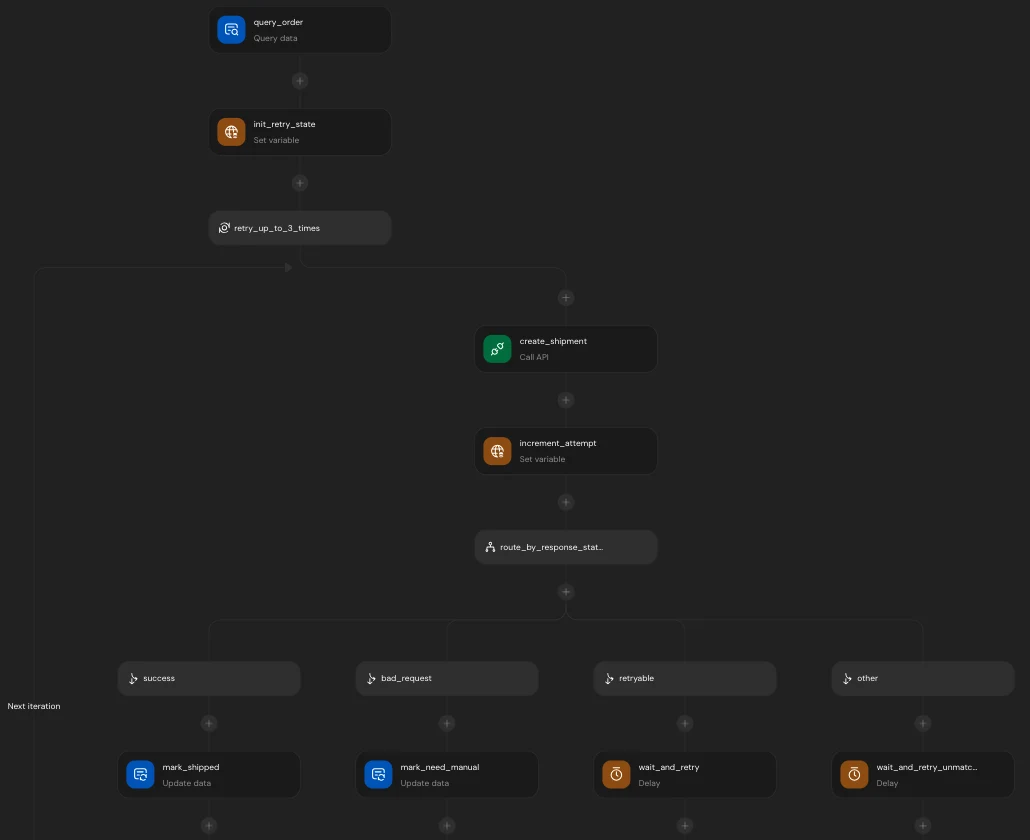
Add these nodes in order:
-
Query data (
query_order): queryshop_orderbyorder_id, limit 1. -
Set variable (
init_retry_state): setattemptto 0 andoutcometoRETRY_EXHAUSTED. In other words, “assume the retries run out”, and overwrite it when the call succeeds or goes to manual handling. -
While loop (
retry_up_to_3_times): the condition isattemptless than 3, so the loop makes at most three API calls. Inside the loop, in order:- Call API (
create_shipment): bind the order number, receiver name, and receiver address to the matching fields of the query node, andmock_statusto the Actionflow input. - Set variable (
increment_attempt):attemptplus 1. - Condition (
route_by_response_status): see the table below. Every Update data node in this flow must filter byidequal to theidreturned byquery_order, otherwise the update has no target row.
Branch Condition Nodes in the branch successsuccessis not emptyUpdate data (status to SHIPPED, tracking number fromsuccess.tracking_no, clear the failure reason) → Set variable (outcometoSHIPPED) → Breakbad_requestbad_requestis not emptyUpdate data (status to NEED_MANUAL, failure reason set to the fixed textLogistics rejected the request (4xx). Check the receiver details and handle manually.) → Set variable (outcometoNEED_MANUAL) → Breakretryablerate_limitedis not empty orserver_erroris not emptyDelay 2 seconds otherAlways (the fallback) Delay 2 seconds - Call API (
-
Condition (
retries_exhausted, after the loop):- Branch
exhausted:outcomeequalsRETRY_EXHAUSTED. First Update data (filter byidas above; status toPENDING_RETRY, attempt count fromattempt, failure reason set to the fixed textLogistics failed 3 times in a row. Waiting for manual action or a scheduled retry.). Then a nested Condition that checks whetherstrictistrue, and if it is, Throw an error whose message includes the order number. - Branch
has_result: always, and does nothing.
- Branch
-
Output: bind the variable
outcome.
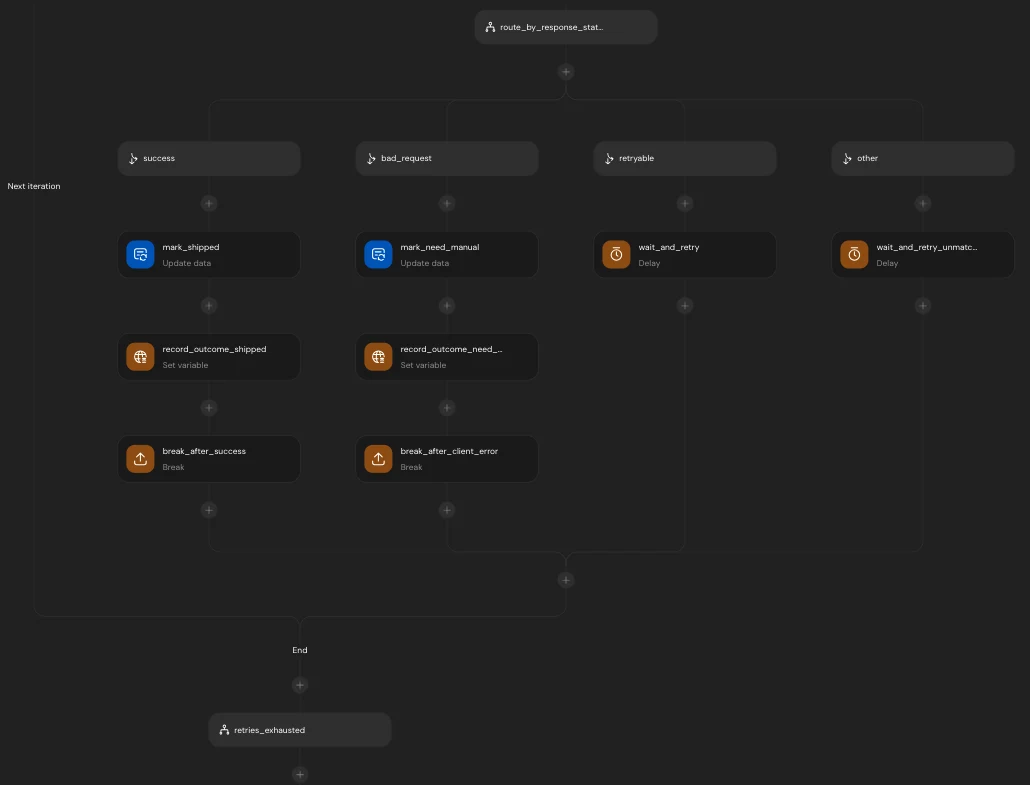
3. Telling which response status matched
In each branch condition, bind the target to the whole object of the matching response status under the Call API node (the option named Self option) and use the operator is not null. Do not bind to a field inside the status, because the server may not return that field.
Actionflow 2: ship_pending_orders
Create an asynchronous Actionflow named ship_pending_orders:
- Query data: the
shop_ordertable, filtered to status equal toPENDING_SHIP, limit 100. - For each: use the query result as the data source. Inside the loop, add a Run Actionflow node that calls
ship_order_with_retryand binds its inputs:order_idto the current item’sid.mock_statusto the last three characters of the current item’sorder_no, the same rule the Ship button uses (see Build the Page).stricttofalse.
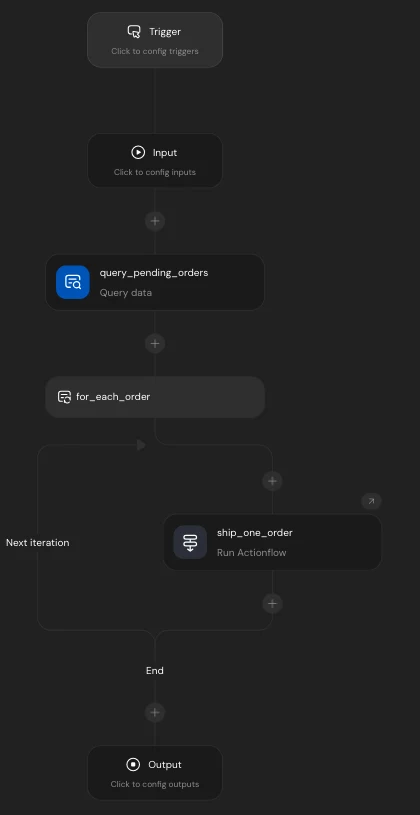
Why strict is false in the batch: if the sub-flow throws, the whole batch Actionflow stops and the orders after it are never processed. In a batch, an order whose retries ran out only needs to be marked as pending retry for a person or a scheduled job to pick up later. Only a single, user-triggered shipment needs to throw, so the failure shows up as a failed task in the Actionflow logs.
Why a Bad Request Does Not Throw
Throwing suits cases that are truly exceptional and need an alert. A 4xx is a normal business result from the API, and the order has already been marked as needing manual handling, so the flow should end normally. That is why it uses Break and not Throw. Only “still failing after three attempts” is worth attention, so the error is used only there.
Permissions
Remove Anonymous Access
In the project’s permission settings:
- For Anonymous User: remove every operation on
shop_order, and make the Actionflow and API permissions an empty allow-list. - For Logged-in User: keep only query on
shop_order, allow only the two Actionflows above, and do not open the API. The API is called from the Actionflow on the server, so users do not need access to it.
Verify the Permissions
Open the order list as an anonymous user and as a logged-in user and confirm: an anonymous user sees no orders and cannot call the Actionflows, and a logged-in user sees the orders but cannot modify or delete them directly.
Build the Page
The page has an order list, a Ship button on each row, and two buttons above the list:
- Order list: the data source is the
shop_ordertable. Each row shows the order number, the receiver, the status, and a Ship button. - Ship button: the click event runs
ship_order_with_retry, bindsorder_idto the current row’sid, and setsstricttotrue. Themock_statusinput is the last three characters of the order number, soT-422simulates a 422. On success, add Show toast and Refresh for the order list. - Ship all pending orders button: runs
ship_pending_orders, with a toast and a refresh on success. - Refresh list button: does one thing, refreshes the order list.
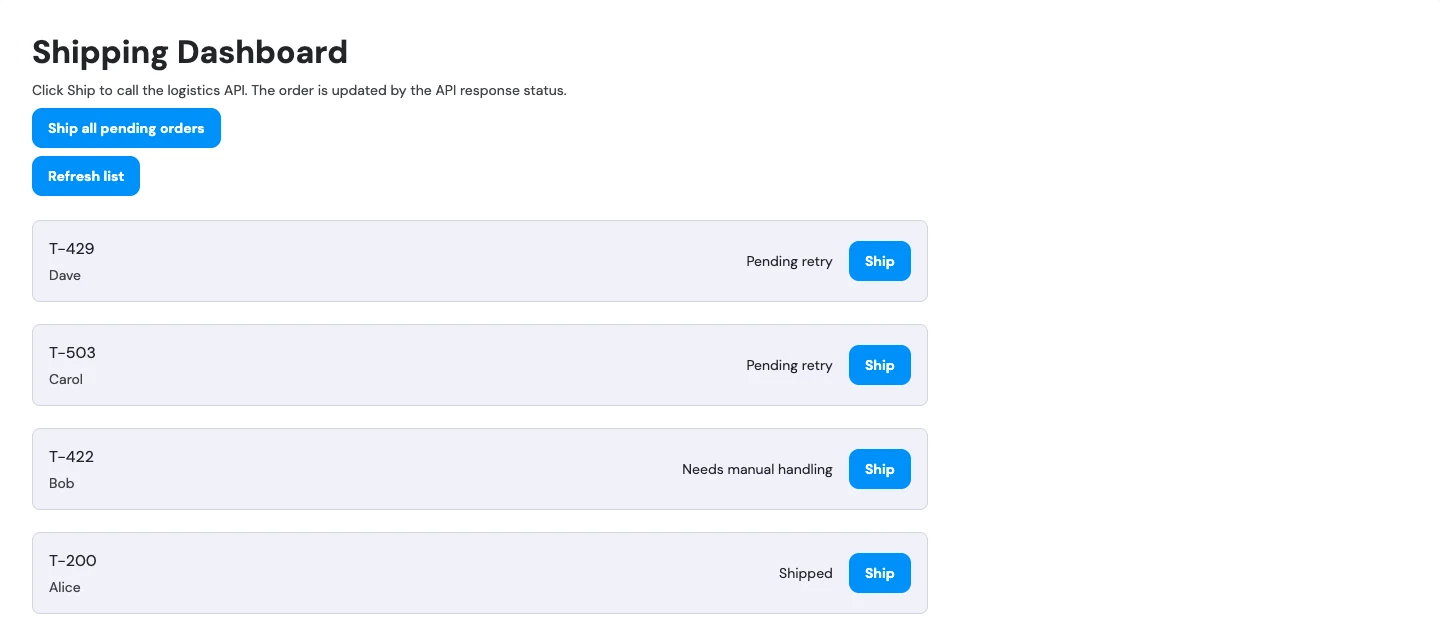
The status is stored as an English enum value, but the page shows a friendlier label. Bind a conditional value to the status text: each branch checks whether the order’s status equals one enum option and returns the matching label, for example NEED_MANUAL shows as “Needs manual handling”.
The example page has no sign-in or sign-up controls, because this is an internal operations dashboard whose accounts should be created by an administrator rather than by visitors. While developing, use Login simulation at the bottom of the preview to pick an existing account, or create one, and the orders will appear. For real use, provide operators with a sign-in entry that fits your team, such as a separate sign-in page or single sign-on.
The Actionflows are asynchronous, so after a click the page only knows the task was submitted and the order status has not changed yet. Retries take a few seconds and a batch takes longer. Use toast text such as “Submitted, refresh to see the result”, and keep a separate refresh button.
Verification
Before testing, add a few orders to shop_order (for example in the Data tab). Give each an order number that ends with the status code to simulate: T-200, T-422, T-404, T-429, T-503, and T-409. Then test each response status at least once:
| Simulated status code | Expected result |
|---|---|
| 200 | The order becomes SHIPPED and the failure reason is empty |
| 422 | The order becomes NEED_MANUAL with a failure reason, and is not retried |
| 404 | Same as 422: NEED_MANUAL, no retry |
| 429 or 503 | The flow makes three attempts with a wait in between, and the order becomes PENDING_RETRY with an attempt count of 3 |
| 409 (an unlisted status code) | Falls through to Fallback, handled as “other”: three attempts, and the order becomes PENDING_RETRY. The order looks the same as in the 429 case, so open the runtime logs and confirm that the Call API output shows Fallback |
Single shipment with strict set to true and a 503 | The task ends as failed with the error message in the Actionflow logs, and the order is still marked PENDING_RETRY |
| Batch with all of the above | Each order follows its own branch without affecting the others |
A few tips for testing:
- After changing an API or an Actionflow, sync the backend, otherwise the change does not reach the running environment.
- When retries run out and
strictistrue, the task ends with a failed status. That is the expected behavior, not a bug. - In the runtime logs you can follow each node of an Actionflow. The output of the Call API node shows which response status matched, for example only
rate_limitedhas a value, or onlyFallback.
FAQ
Why does every request end up in Fallback?
Check these in order:
- The response
Content-Typeisapplication/json. Empty bodies, plain text, and web pages all fall through toFallback, even when the status code matches. - The status code is actually listed in a response status.
- The method and URL are right. For example, if the provider does not support the method you used, it may return an HTML error page, which is not JSON either.
Why branch in the Actionflow instead of handling errors inside the API?
The API only describes the request and the response shapes. What to do after a given status is business logic, and it belongs in the Actionflow, where it can update the order, wait, retry, and report in one place.
Is a fixed 2-second wait enough?
The example uses a short fixed wait to keep testing quick. In real use, make the wait grow with each attempt (for example 2 seconds, then 4), and respect the provider’s rate-limit policy. Rate-limit responses often include a suggested wait time.
What happens to orders whose retries ran out?
They are marked as pending retry. You can click Ship on them again, run the batch again, or add a scheduled trigger that reprocesses them periodically. See Order Status Auto Updater.
Summary
- Use response statuses to tell an API’s outcomes apart. Status codes must not overlap, and the response body must be JSON.
- Branch in the Actionflow on “which response status is not empty”. Do not bind to a field inside a status.
- Retry recoverable failures inside the flow with While loop + Delay + Break, and send unrecoverable failures to manual handling.
- Use Throw only where something really needs to be reported, and avoid letting one order’s failure stop the others in a batch.
- After creating a data table, tighten the permissions that are open by default.