2026 Changelog
v3.0 | Released in September 2026
This release reorganizes the editor architecture, rebuilds external API integration and the data model editor, adds AI Copilot (an AI builder inside the editor), object types and developer access, and rolls out the new design system throughout.
Product architecture and design system
Editor architecture rebuilt
The old feature-by-feature menu is replaced by four sections — Design, Data, Action and Settings — matching the four stages of building software: interface, database, backend services, and operations. You no longer need to remember which menu a setting hides in: find the right area by common sense, then hit Publish when you are done. Read the docs
| Section | Stage of development | What lives here |
|---|---|---|
| Design | User interface | Pages, modals, components |
| Data | Database, type and variable declarations | Data model, database, objects, enums, resources, client variables |
| Action | Backend services | Actionflow, API, AI, verification code, sign in, payment |
| Settings | Operations | General, permissions, domain, SEO, secrets, script injection |
Design system update
The new design system is applied throughout: the interface of all four editor sections, the full set of design components such as modals and forms, page states such as lists and empty states, plus the icon set and design tokens.
AI Copilot
AI Copilot is now generally available — an AI builder inside the editor that can build pages, components, data models, actionflows, APIs, AI agents and more for you. Read the docs
- Where to find it: top bar → AI Copilot.
- What it can build: covers all four sections — Design, Data, Action and Settings — and can produce a complete front-end and backend configuration. Its output is equivalent to building by hand.
- Usage and billing: Copilot consumption is metered in AI Points. Check your available balance and every transaction under User center → Wallet.
- Grant sources: signup bonus, purchase, promotion, education grant and support adjustment.
- Metering: consumption is recorded separately for agent turns, context compaction, subagents, skill generation, replays and session titles.
- Points can be drawn from a project’s quota.
Design
- Component system rebuilt: the whole component system was rewritten from the ground up, and the new components come closer to hand-written front-end code in both styling range and rendering performance.
- Custom modals rebuilt: modals are now global elements. A custom modal you create can be opened from multiple places, so the same modal no longer has to be rebuilt on every page.
- Missing style properties filled in: system components gained a batch of style properties they were previously missing, reducing the cases where a design could be drawn but not built. Read the docs
- Reconnecting component styles to the primary breakpoint: component styles that are disconnected from the primary breakpoint are now shown explicitly, and can be reconnected. Read the docs
- Placeholder image for video upload: the video upload component can show a placeholder while an upload runs, instead of an empty area.
Data
Data model
-
Editing interface rebuilt:
- Table details consolidated into five tabs: Field, Constraint, Permission, Vector storage and Trigger, so everything about one table is viewed and edited in one place. Read the docs
- Relationship view: see how tables relate to each other as a graph, which keeps the data structure legible once the table count grows.
-
Field editing improved:
- API name: set a field’s API name when you create it, and see it on the field details.
- Function fields: a new field type with a configurable return value and return type, letting the database compute values derived from other fields instead of repeating the same formula everywhere it is used.
- Continue to create: after adding one field, go straight into the next without reopening the dialog.
- Drag-to-reorder and bulk delete: fields can be reordered by dragging and deleted in bulk. Field order drives how columns and form inputs are presented, so adjusting it no longer means deleting and recreating fields.
- Impact shown before deletion: deleting a table or field lists the configurations it affects first, so bindings do not silently fail afterwards.
Database
- Grant roles directly: roles can be added to an account from account data management, so testing permissions no longer requires writing an actionflow to grant them.
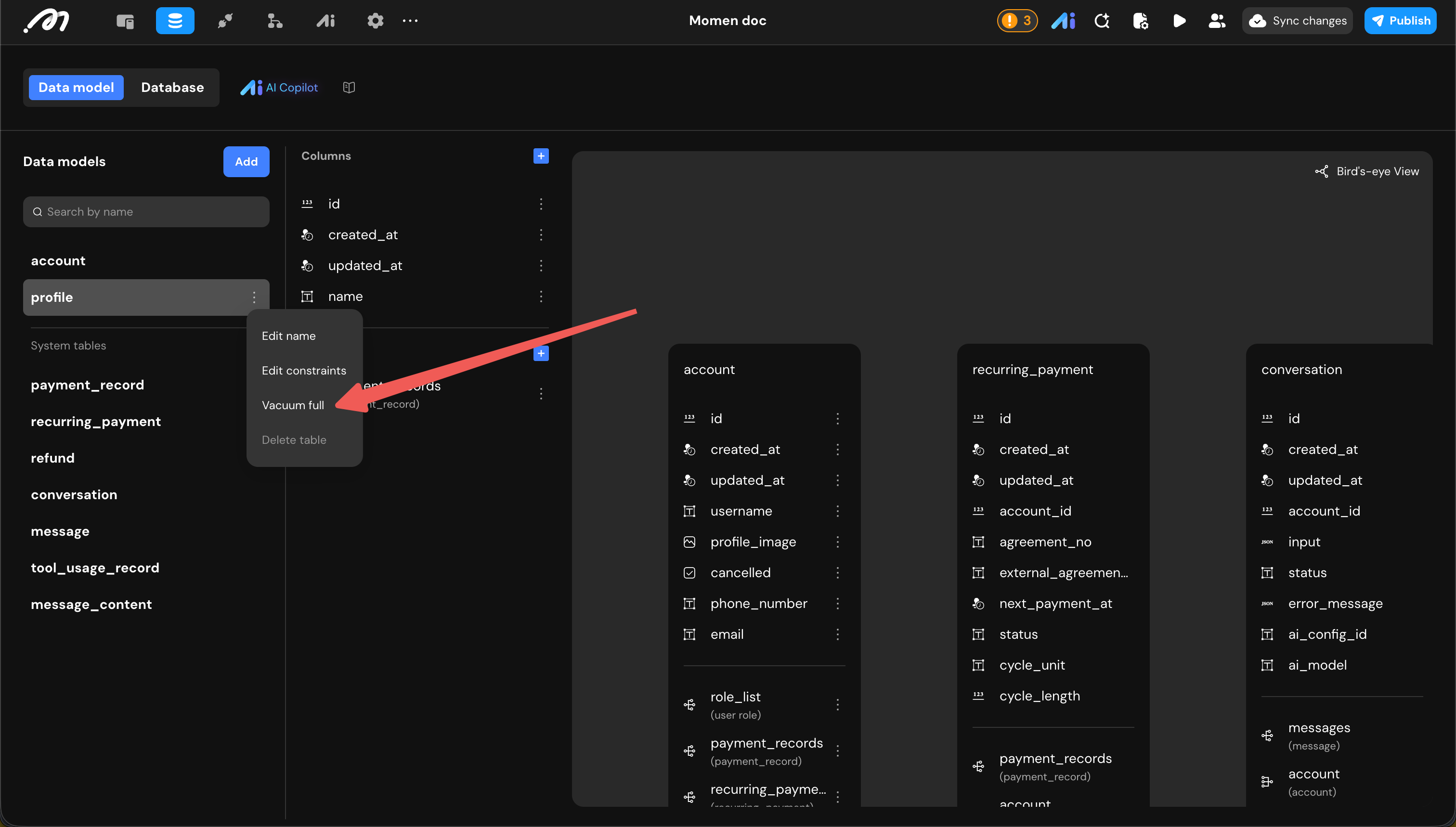
- Vacuum full: physically rebuilds a table to fully reclaim storage, which is worth running after large deletions. The table is locked while it runs, so schedule it during low-traffic hours.
Custom type and enums
- Custom types added: declare and use your own structured types. Define one once and reuse it across APIs, the data model, actionflows and AI agents. Read the docs
- Enum types added: declare and use enum types. Read the docs
Resources
- Resource management: browse images, videos and files with size and reference information, down to the referring table and field, to judge whether a file is safe to delete. Read the docs
- One-click cleanup of unreferenced resources: delete everything unreferenced in one pass to reclaim storage.
Action
Actionflow
- Nodes:
- Four new nodes: delay, throw error, while loop and break. Read the docs
- Input and output nodes support arrays and object types.
- Data query nodes now require a limit: without one, only aggregate fields are available, which prevents accidental full-table scans from overloading a live database.
- Debugging: configure inputs and run a whole actionflow, with database writes rolled back afterwards, so you do not have to keep cleaning up test data.
- Runtime rebuilt: the execution path was rewritten, with more accurate error messages and no silently swallowed exceptions.
- External access: every actionflow gets its own GraphQL API, so outside systems and your own front end can trigger it directly. Read the docs
API
External API integration was rewritten as a whole: importing, testing and configuring responses no longer means entering everything by hand. Read the docs
-
Import: import from OpenAPI documents (
.yaml/.json) or a cURL command, bringing in a whole set of APIs at once instead of entering them one by one. When an import fails, AI can analyze the cause. -
Requests and responses:
- Expanded to 5 request methods: GET, POST, PUT, DELETE and PATCH.
- Expanded to 3 body formats:
application/x-www-form-urlencodedandmultipart/form-datajoinapplication/json, so form submissions and file uploads can be integrated. - Responses branch by status code: configure a separate response structure per status code, with
2XXwildcards and a default fallback. APIs that return different shapes on success and failure no longer need manual branching and parsing in an actionflow. - Testing inside the editor: send a request and see status code, duration and content type; merge the result into a chosen response status or overwrite it, or generate a structure straight from raw JSON instead of typing fields.
-
Organization and usage:
- APIs live in collections, and each collection has its own variables (base URL, token and so on) shared by the whole set. APIs can move between collections.
- Pagination: turning it on generates page-index and page-size system inputs. Bind them to the API’s pagination parameters and a front-end list pages automatically with “Load more”.
- Responses bind directly: an API response can be bound straight to components, or passed to an actionflow or to AI.
Verification code, sign in and payment
- Custom verification code delivery: integrate your own SMS or email channel such as Twilio, bind delivery to your own actionflow, and customize content, signature, template and variables. This gets you past the platform’s SMS restrictions, message wording stays on brand, and several delivery methods can be configured at once for better delivery rates.
- Email verification code sign-in: end users can sign in with an email address and a verification code, without a phone number.
- SSO user-info authentication method: SSO gained a setting for how user info is authenticated, for identity providers with specific requirements at that step. Read the docs
- Airwallex payments added: accept payments through Airwallex, covering more currencies and regions. Read the docs
Developer access
A Momen backend is a self-documenting GraphQL service. This release opens it up properly: the top bar gains Developer access, where you pick up the endpoint and credentials needed to program against your project’s backend without going through the editor — or hand that work to an AI coding tool. Read the docs
- Endpoint and access token: the GraphQL endpoint, the subscription endpoint and an Admin Bearer Token. External clients send the token with each request. The API is self-documenting, and its shape tracks changes to your project automatically.
- GraphiQL playground: debug GraphQL queries inside the editor, with no separate client to install.
- Edit a project from a coding agent: integrate through the Momen plugin or MCP, covering Claude Code, Cursor (including team marketplaces), OpenCode and other MCP-capable tools.
Other improvements
- User center and project detail rebuilt: project list, project detail and account settings have been reorganized.
- Cloning and template creation no longer block the front end: creation runs in the background instead of holding you on a waiting screen.
- New
regexReplaceformula: regular-expression replacement, so string cleanup and formatting no longer need a run-code node. Read the docs - Account deletion cooldown: after an account is deleted, its phone number, email address and any linked third-party accounts enter a 90-day cooldown. During that period they can neither register a new account nor be bound to an existing one, and the attempt reports that the account has been deleted. Signing in with a third-party account is additionally checked against the email address that provider returns.
Bug fixes
Over 200 bugs fixed in this release.
v2.4.1 | Released in May 2026
🚀 New Features
- Verification code: Upgraded verification code configuration now supports flexible integration with custom SMS/verification providers.
- Publishing: Added manual interruption for preview sessions that remain pending for more than 20 minutes.
- Agent Builder: Tools now support image and video inputs, enabling richer multimodal AI workflows.
- Secret: Added Secret support for securely storing sensitive information such as tokens, keys, and credentials.
✨ Enhancements
- Agent Builder
- Optimized prompt template structure by merging role, task details, and constraints into the system prompt.
- Added support for configuring the first user message.
- Improved knowledge base formatting when injected into prompts.
- Structured output no longer automatically appends JSON schema descriptions into the system prompt.
- Existing configured and published agent data will be migrated equivalently.
- Domain Configuration
- Renamed custom domain settings to unified Domain settings.
- Added free domain display support;
- Action
- Improved transaction execution to preserve operation order and ensure execution within the same transaction.
- Optimized batch operation interaction to align with loop.
- Static Assets
- When pasting across projects, static assets from the source project such as uploaded images and videos are now cleaned up automatically to avoid broken references.
🐞 Bug Fixes
- Fixed an issue where renaming newly added Actionflow inputs affected other bound data.
- Fixed multiple cases where publishing or preview remained stuck for a long time and could not be canceled.
- Fixed issues with logs failing to load, incomplete log content, and 401/500 errors in project logs.
- Fixed Agent / AI debugging issues including mismatched prompts, incorrect outputs, and errors after deleting structured output fields.
- Fixed preview, publish, Native App deployment, and custom domain deployment issues in multi-client projects.
- Fixed issues where refactored code components did not show outputs correctly or caused binding errors.
- Fixed migration issues such as missing page paths, incorrect borders/fill/min-height, and missing modal close interactions.
- Fixed incorrect Data Binding paths, display name inconsistencies, and datasource rendering issues.
- Fixed multiple database issues in bulk updates, data import, dependency validation after field deletion, and filter configuration.
- Fixed formula-related issues including incorrect type inference or results in array_mapping, array_sum, GET_DATE_TIME, and JSON_EXTRACT_PATH.
- Fixed various editor and runtime issues in input, number input, selection view, list, conditional container, switch, and progress components.
- Fixed integration issues with webhook, payment callback, Stripe refund, Airwallex refund, and verification code delivery.
- Fixed cross-project component copy issues where media assets were not copied correctly, including SVG content_type loss.
- Fixed visibility, disabled-state, and runtime validation issues related to permissions and Row-Level Security (RLS).
- Fixed several AI model issues including failed invocations, sessions stuck in IN_PROGRESS, streaming behavior, and multimedia input compatibility.
- Fixed editor stability issues such as crashes, OOM, sync anomalies, and incorrect config persistence after passive refresh.
v2.4.0 Release Notes | Mar 23, 2026
Release Period: Dec 12, 2025 - Mar 23, 2026
🚀 New Features
- AI Copilot
- Smart Data Binding: Introduced an AI-powered assistant to enable one-click intelligent data binding.
- AI Code Assistant: Integrated AI capabilities into code block nodes to streamline logic generation.
- Actionflow & Nodes
- AI Video Generation: Added Gemini-Veo 3.1 node for high-fidelity video generation directly within workflows.
- Save File: Added a new Save File node, supporting direct storage of documents, images, and videos to project-level cloud storage.
- Database Management
- Data Insights: Added the ability to view total record counts for better data overview.
- Space Optimization: Added a new Vacuum Full feature that reclaims database storage and optimizes performance by recycling unused space.
✨ Enhancements
- Performance & Core Logic
- Engine Optimization: Refined the core Schema structure, significantly boosting development and loading speeds.
- Streamlined Actions: Fully audited all built-in actions, resulting in a cleaner menu and more intuitive configuration panels.
- User Experience
- AI Enhancement: Added PDF input support (exclusive to Gemini).
- Flexible AI Copilot Interface: The AI assistant panel now supports custom width adjustment and free-floating drag-and-drop.
- Refined Component Logic: Optimized the Cut and Paste logic, removing previous restrictions on specific components.
- Reset Password Action: Password reset now supports verification via the previous password.
- Security & Permissions
- Granular Sharing Control: Clone Permission is now an independent toggle, decoupled from user roles for more precise collaboration.
- RLS Management: Advanced Permissions has been renamed to Row-Level Security (RLS) for industry-standard clarity.
- Payments Feature
- Subscription Logic: Updated Stripe subscription cancellation to Cancel at Period End, ensuring users retain access until the end of their billing cycle.
- Payment Actionflows: Added conditional branching for subscription status within built-in payment Actionflow.
🪙 Commercial Adjustments
- Web Publishing: Production deployment is now exclusive to paid tiers.
- Storage Pack Upgrade: Database add-on capacity increased from 1GB to 10GB at the same price. Existing active orders will be automatically credited with the additional storage.
🐞 Bug Fixes
- Fixed an issue where custom domains were not blocked by the paid-feature popup.
- Fixed incomplete log message display.
- Fixed an issue where sensitive fields (such as passwords) appeared when using the account table as a loop data source.
- Fixed a
400error in the Save Image node. - Fixed abnormal list width rendering.
- Fixed an issue where
GET_DATE_TIMEresults did not match the selected type. - Fixed an issue where repeated Agent session creation in AI consumed multiple WebSocket channels.
- Fixed a right-sidebar crash when adding a custom array operand and binding values in Condition expressions.
- Fixed an issue where the Cursor Rules + MCP template project could not be previewed.
- Fixed line-wrapping issues for overly long Pro plan names.
- Fixed an issue in
JOINwherearray_mappingcould not access image-type fields from the source array. - Fixed an issue where Data Selector size appeared in red when the data source was empty.
- Fixed an issue where AI debug output in conversations could not be copied.
- Fixed an issue where Actionflow nodes could not update the account-table deactivation field.
- Fixed an issue where page parameter changes in Share Action did not update configured actions in real time.
- Fixed an issue where updating the account-table deactivation field in Actionflow did not take effect.
- Fixed an error when passing
image(url_media_encode)into custom Actionflows. - Fixed verification-code sending errors.
- Fixed an issue where deleting session nodes in Actionflow did not take effect.
- Fixed errors when adding domains.
- Fixed an issue where multi-client publishing to custom domains got stuck in a loading spinner.
- Fixed abnormal icon rendering for running Actionflow nodes.
- Fixed outages of Ernie and DeepSeek large models.
- Fixed a system crash caused by naming a database table
"log". - Fixed an issue where Gemini 3 Flash calls got stuck in
in_progress. - Fixed database
500errors and log401errors. - Fixed database generation errors.
- Fixed an issue where payment-success callbacks were ineffective and system order status was not updated.
- Fixed missing close/cancel interaction logic on system-table detail pages.
- Fixed some prompts that should not have been displayed.
- Fixed an issue where API required fields were filled but still reported as missing.
- Fixed an issue where switching conditions in conditional containers did not update in the editor.
- Fixed an issue where an Actionflow input named
'input'showed a localized label instead of the expected English identifier in bindings. - Fixed an issue where condition-action modal settings and right-sidebar conditions were out of sync.
- Fixed incorrect
typejudgment logic in permission settings. - Fixed insufficient
momen-logcleanup logic (now adjusted to retain 365 days). - Fixed abnormal error prompts for AF node references after deleting deployed fields.
- Fixed missing action names in insert-data actions.
- Fixed an issue in 5.0 where Loop nodes could not use query results as a data source.
- Fixed an issue where cross-page copying of conditional containers failed with unrecognized errors.
- Fixed some unreadable display names.
- Fixed abnormal
display namerendering. - Fixed accidental exposure of Enum values.
- Fixed editor crashes when clicking data sources in batch data modification.
- Fixed an issue where paid users were not correctly linked to the paid-group entry.
- Fixed missing prompt and result in the
AI debugpanel after trigger. - Fixed an issue where the sync-changes button did not disappear after creating a new project.
- Fixed an issue where web template detail pages showed nothing when trial links were empty.
- Fixed project upgrade failures.
- Fixed a bug in setting variables within Actionflows.
- Fixed an issue where lists inside Tab components could not scroll.
- Fixed invalid non-empty checks in Select View.
- Fixed an issue where editing API output types could corrupt saved data and prevent project opening after system refresh.
- Fixed repeated popup notifications in User Center after clicking Confirm.
- Fixed API execution errors in online projects.
- Fixed an issue where trial Pro users still received paid-group join prompts.
- Fixed missing
requiredconcept in custom node template input/output parameters. - Fixed an issue where copied-project triggers did not fire successfully.
- Fixed failures in Nano Banana image generation.
- Fixed an issue where frontend options inside lists were not blocked in the Refresh List action.
- Fixed missing documentation for related limitations.
- Fixed an issue where Select View default values did not apply when the data source was API.
- Fixed an issue where users could repeatedly free-trial the same template.
- Fixed errors during combined Actionflow execution.
- Fixed an issue where onboarding project resources were unavailable after publishing.
- Fixed incorrect Favicon path references.
- Fixed an issue where Google crawler could not recognize HTML for Favicon.
- Fixed failed date-time format conversion for page variables.
- Fixed an issue where Input default value type labels should be shown in Chinese.
- Fixed an issue where Actionflow errors were not marked in red at Zed reference locations.
- Fixed file corruption in the database.
- Fixed an issue where importing Excel with conflict-skip enabled still threw errors and failed to add data.
- Fixed missing validation on blur-save.
- Fixed project log
401errors. - Fixed trigger execution failures.
- Fixed an issue where components with children could not be grouped via Shift multi-select in the left sidebar.
- Fixed an issue where
CONSTRAINTStags still appeared when AI constraints were empty. - Fixed deployment failures caused by custom relation names conflicting with system tables.
- Fixed unsupported
thought_signaturein Gemini fields. - Fixed unsupported audio file input in Gemini models.
- Fixed abnormal data-binding behavior.
- Fixed unresponsive settings button clicks.
- Fixed an issue where border radius did not support breakpoint configuration.
- Fixed an issue where copying components using local data still pointed to the original component path.
- Fixed an issue where rich-text components did not wrap lines on the canvas.
- Fixed an issue where upgrading to Pro did not properly refund the Advanced plan.
- Fixed unexpected server restarts.
- Fixed project activation failures.
- Fixed project log access errors.
- Fixed AI debug errors.
- Fixed an issue where inner lists re-requested data when nested lists used Load More.
- Fixed an issue where Body fields could not be deleted in advanced third-party API debug settings.
- Fixed an issue where Select View components did not filter out scroll-to actions.
- Fixed unreasonable Load More positioning after enabling reverse loading on lists.
- Fixed icon alignment offset in external storage AF nodes.
- Fixed redundant prefixes in action results.
- Fixed an issue where sync changes showed modifications even when data models were unchanged.
- Fixed popup component styles and fixed-width issues.
- Fixed missing mouse display configuration for
casein conditional containers. - Fixed an issue where
set_page_datadid not take effect when async Actionflow succeeded. - Fixed an issue where selecting the same value in Data Selector still triggered actions.
- Fixed an issue where Webhooks were not created on demand during backend deployment.
- Fixed missing multi-select support in file management.
- Fixed missing output-definition passing in AI debug.
- Fixed popup errors.
- Fixed project backend deployment failures.
- Fixed an issue where auto-trigger execution counts in Actionflow were not deducted correctly.
- Fixed an issue where users could not enter projects.
- Fixed an issue where users could not download PDFs.
- Fixed an issue where latitude and longitude could not be assigned to global variables.
- Fixed errors when opening project logs.
- Fixed unresponsive behavior when jumping to Actionflow from payment configuration.
- Fixed an issue where scheduled tasks still ran after deletion and deployment.
- Fixed missing payment callback and scheduled-task schema in pre-created projects.
- Fixed an issue where multi-client publishing stayed in a persistent loading state.
- Fixed an issue where duplicate registration API names returned database errors instead of business errors.
- Fixed mismatched-result errors when selecting GPT models with structured output in AI.
- Fixed an issue where projects created from templates released in specific time windows could not be opened.
- Fixed deployment failures caused by dirty data in projects.
- Fixed frequent editor crashes during sync changes and preview updates.
- Fixed an issue with corresponding capacity after changing database status to unpaid.
- Fixed an issue where Actionflows could not read callback parameters.
- Fixed errors when Actionflows called other Actionflows.
- Fixed an issue where scheduled-task Actionflows lacked input-parameter configuration and prompts.
- Fixed
401errors when opening logs across multiple projects. - Fixed an issue where code components were not shown in the left sidebar and versions could not be managed.
- Fixed an issue where multi-client projects remained stuck in preview status.
- Fixed an issue where popups could not be closed by clicking the overlay.
- Fixed AF errors in Education edition review.
- Fixed incorrect icon colors in the toolbar after selecting components.
- Fixed an issue where the editor could not be entered.
- Fixed an issue where border sides could not be adjusted in hover state.
- Fixed continued call failures after switching Gemini model versions.
- Fixed access-log errors.
- Fixed abnormal height changes when switching tabs in template popups.
- Fixed a series of copywriting/text issues.
- Fixed Actionflow execution failures reporting
TPAerrors. - Fixed database import errors.
- Fixed project reset failures.
- Fixed Actionflow execution failures reporting
DELETE_OR_UPDATE_MUST_HAVE_FILTER. - Fixed spelling errors in code or documentation.
- Fixed an issue where video input became invalid when AI received both image lists and video simultaneously.
- Fixed internal server errors when entering server-side mode.
- Fixed failures when migrating projects from old payment to new payment.
- Fixed a bug in list scroll validation within the editor.
- Fixed diff validation errors when switching code component versions.
- Fixed editor memory overflow (OOM) and applied performance optimizations.
- Fixed unexplained error popups in logs.
- Fixed input-type mismatches in scheduled-trigger Actionflow parameters.
- Fixed an issue where copied components in the editor could not be pasted.
- Fixed support for Bilibili in video components for mainland environments.
- Fixed a missing file column in the
ss message_contentdata model. - Fixed AI run failures.
- Fixed poor readability in database rich-text editing due to white text on white background.
- Fixed extra characters displayed in payment orders.