2025 Changelog
v2.3.2 | Dec 2025
✨ Enhancements
- Unified AI Copilot: Integrated the AI Assistant and AI Copilot into a single, cohesive interface. Users can now seamlessly switch between Knowledge (Q&A) and Builder (Data Modeling) modes for a streamlined workflow.

-
Actionflow Auto-save: Streamlined the saving mechanism. Changes are now saved automatically and applied during backend synchronization, eliminating the need for a manual “Save” action.
-
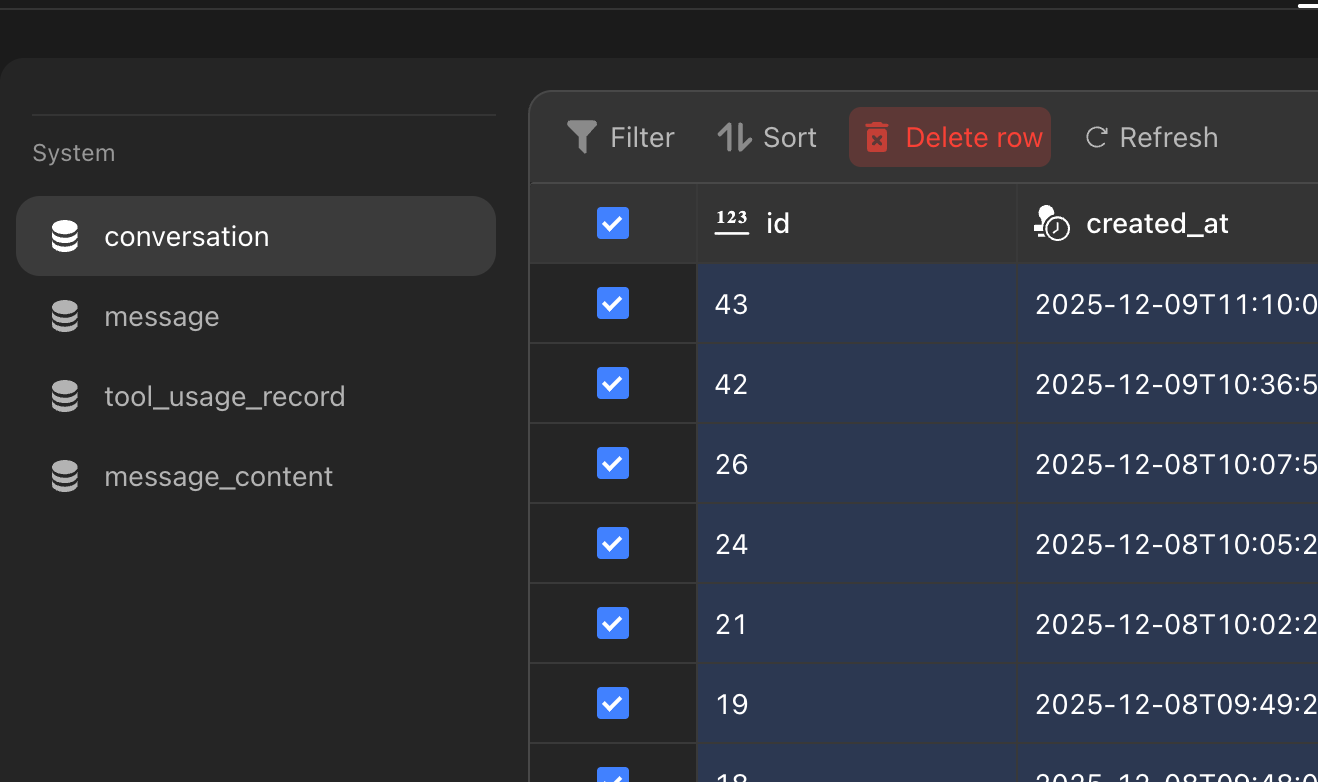
AI Agent Data Management: Enabled the deletion of data tables associated with AI conversation history, offering better data control.
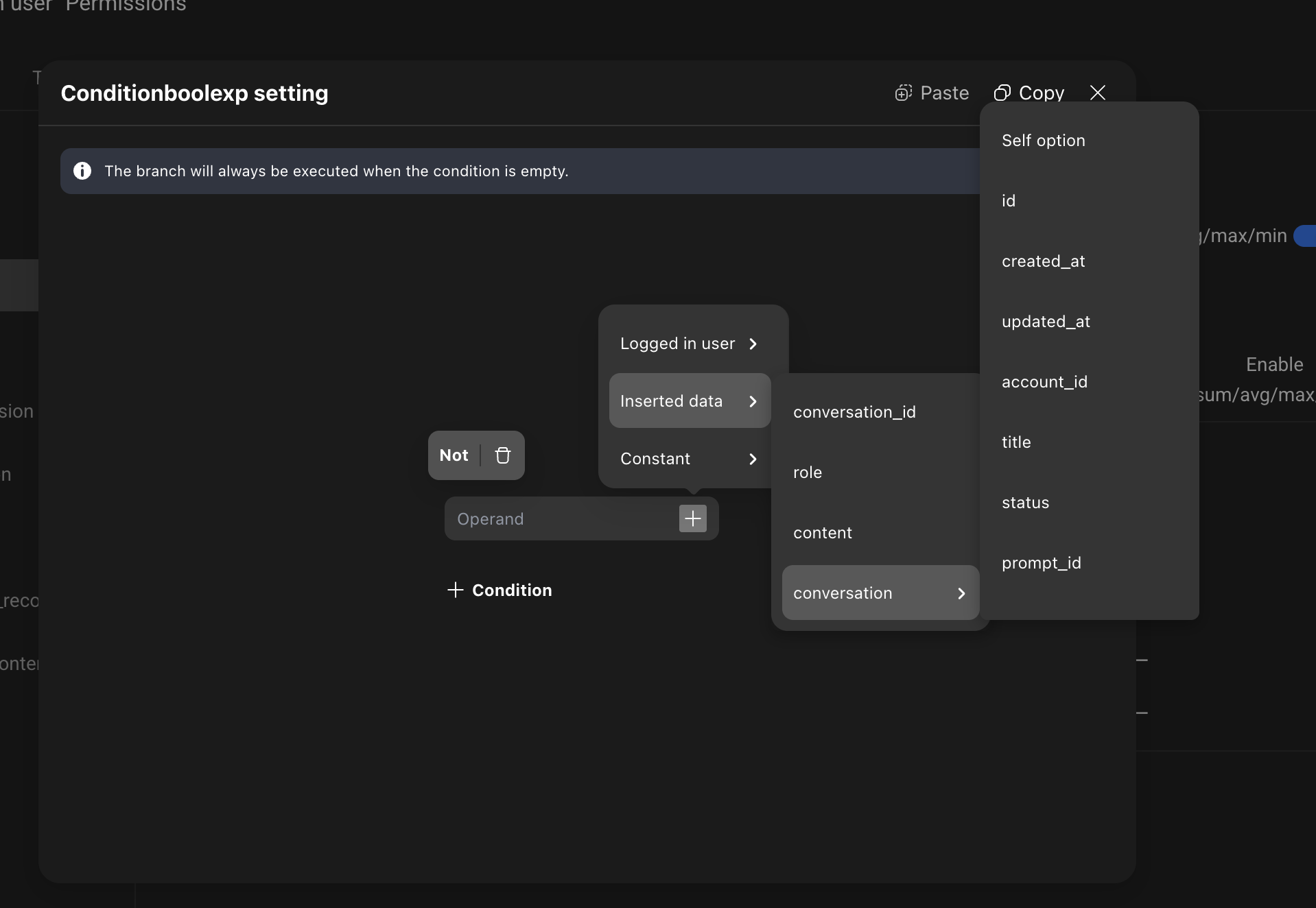
- Advanced Permissions: Data creation configurations now support selecting content from Related Tables, allowing for more granular permission logic.
🐞 Bug Fixes
- Fixed an issue in Mirror where clicking the payment button during the waiting period made all click operations invalid
- Fixed an issue where deleted roles appeared as UUID values in real-time preview and needed synchronous deletion
- Fixed an issue where clicking “Update Preview” during backend sync changes would report a preview failure error
- Fixed a mismatch between AI output time and database timezone
- Fixed an issue where Emoji characters caused data binding to crash
- Fixed an issue where clicking “Update Preview” in the editor only published the frontend without publishing the backend
- Fixed an issue where scheduled tasks in triggers continued running after deletion and backend deployment
- Fixed blank project creation failures
- Fixed an issue where projects created from templates could not be opened after a template was published
- Fixed removal of titles in the action tab
- Fixed an issue where the
thought_signaturefield was not supported for Gemini models - Fixed an issue where new pages could not be created on the web client
- Changed registration API to show business errors instead of database errors when duplicate usernames exist
- Fixed right sidebar crashes when adding data actions
- Fixed inability to bind calendar component data
- Fixed lack of multi-select support in file management system
- Fixed inability to retrieve callback parameters in Actionflows
- Fixed an issue in data selector where boolean field selections displayed incorrectly in preview
- Fixed database access failures
- Fixed backend deployment failures in multi-client projects
- Fixed an issue where images in nested conditional containers did not display on mobile but showed in real-time preview
- Fixed diff validation exceptions
- Fixed an issue where validation errors could not be located
- Fixed black screen when clicking validation errors
- Fixed data bird’s eye view update mechanism issues
- Fixed an issue where project search query fields did not match user input, causing incorrect query results
- Fixed an issue where published web preview links opened outdated pages instead of the latest version
- Fixed incorrect default component height in the editor
- Removed “Provide Tool Information” from the action menu
- Fixed missing zip suffix in exported download files
- Fixed
java.lang.IllegalArgumentExceptionerrors in Actionflow output options - Fixed database trigger failures
- Fixed code component documentation issues
- Fixed AI model
max_tokensdefault values not taking effect - Fixed an issue where nested lists with outer list limits exceeding 7 caused inner list data not to display
- Fixed web project publication timeout issues
- Fixed errors in “Get Current Latitude and Longitude” action
- Fixed inability to parse variable values as date/time
- Fixed read-only permission issues
- Fixed image generation failures when calling Nanobanana model agents in Actionflows
- Fixed inability to bind scan QR code action results to page variables
- Fixed AI assistant execution failures
- Fixed an issue where API-returned arrays used as loop action data sources could not retrieve array values in event data
- Fixed an issue where the sync changes indicator in the top-right corner still showed pending changes after synchronization
- Fixed black screen when clicking Actionflows
- Fixed DURATION formula not taking effect
- Fixed print action errors where components could not be found
- Fixed an issue where the publish button in multi-client projects kept spinning
- Fixed user-reported abnormal traffic spikes
- Fixed an issue where opening vector configuration for data model fields and selecting
text-embedding-3-largecaused backend deployment failures - Fixed an issue where “Enter Database” in project details redirected to the page address instead of the database
- Fixed table order changes after cloning projects
- Fixed an issue where deleted projects still had accessible cave pages
- Fixed inability to scroll through theme color configuration lists
- Fixed text errors
- Fixed an issue in map component where selecting default marker icons caused diff validation errors and prevented selection
- Fixed user-reported issues where many AI processes remained in
in_progressstate - Fixed incorrect date type return format in Actionflows
- Fixed payment configuration activation not responding
- Fixed backend deployment errors
- Fixed an issue where callback-triggered Actionflows did not find matching conditions when they actually existed
- Fixed text visibility issues in rich text editor p tags
- Fixed missing UI configuration restrictions
v2.3.1 | Released in October 2025
🚀 New Features
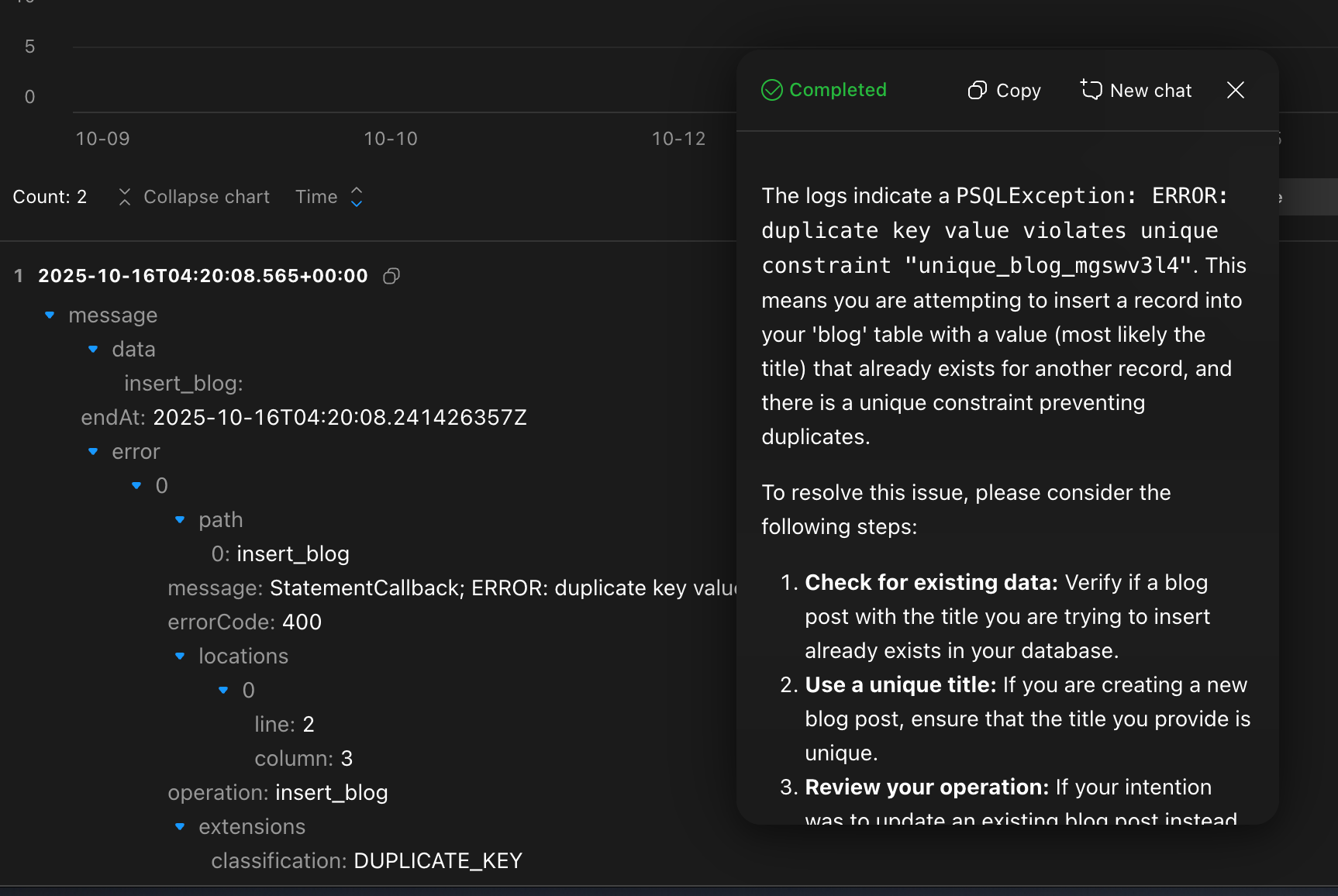
- AI Log Assistant: Intelligently correlates log context, automatically analyzes error patterns, and pinpoints root causes, enhancing troubleshooting efficiency.
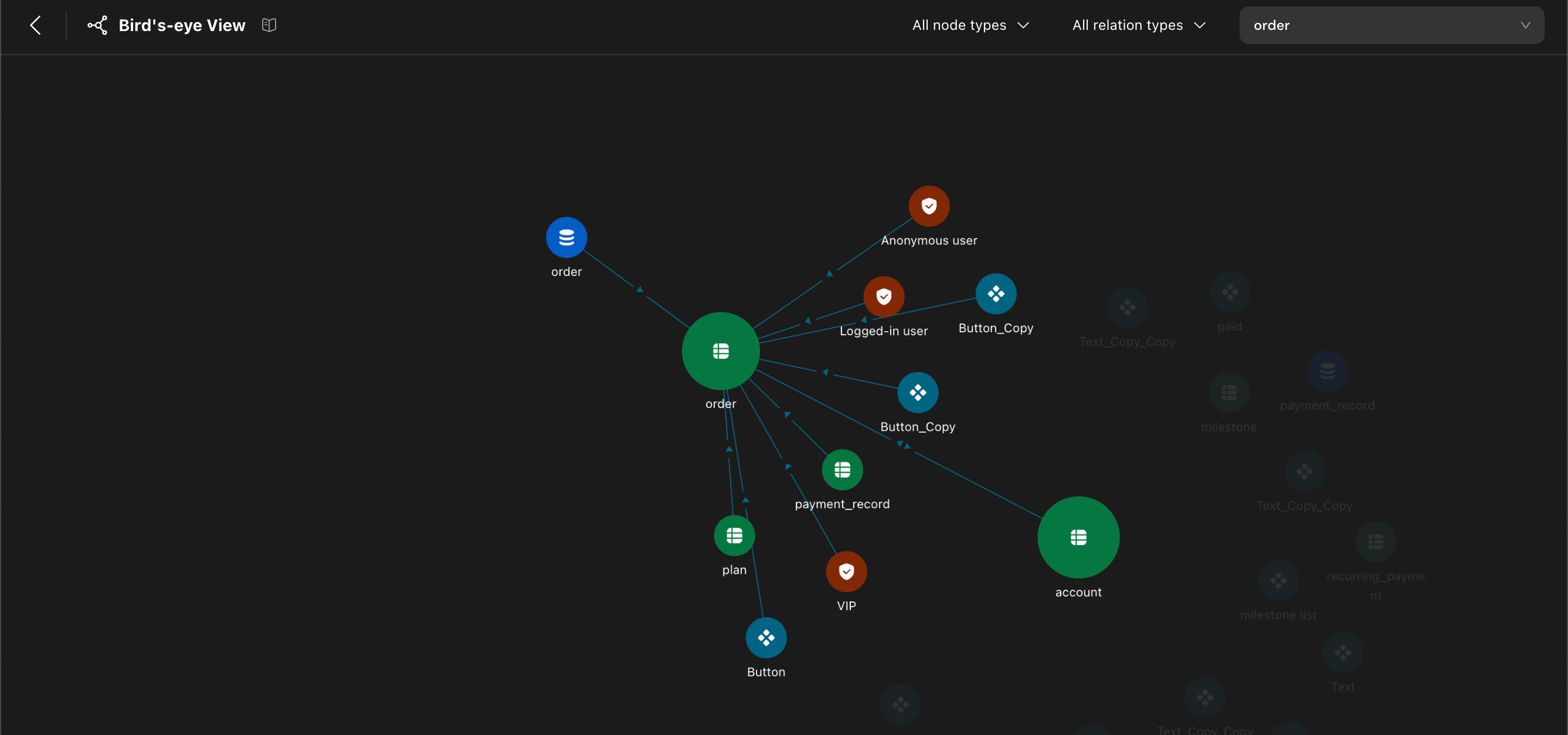
- Data Bird’s Eye View: Visualizes data interaction relationships between frontend and backend services from a global perspective, helping you understand system call chains and dependency structures. Learn more: Data Bird’s Eye View
✨ Enhancements
- Payment Actionflow: Optimized process logic and naming conventions to improve readability and business consistency.
- Open External Link Action: Added support for choosing to open links in “New Tab” or “Current Tab”.
- Actionflow Trigger: Unified the renaming of “Callback” to “Webhook” for more standard terminology and clearer semantics.
🐞 Bug Fixes
- Fixed an issue where the DURATION formula did not take effect
- Fixed an issue where the sync changes indicator in the top-right corner still showed pending changes after synchronization
- Fixed Actionflow execution errors
- Fixed an issue where canvas scrolling triggered browser back navigation
- Fixed database insertion permission errors and issues where specific field permissions couldn’t be enabled but frontend could pass values
- Fixed an issue where the Actionflow AI node showed a black screen after clicking the plus sign to add a conversation
- Fixed an issue in cloned projects where payment configuration existed but settings showed it needed activation and clicking had no response
- Fixed an issue where deleting AI conversations caused deployment failures
- Fixed an issue where both “View to Bitmap” and “View to Image” existed simultaneously
- Fixed an inconsistency issue with AI local file uploads
- Fixed broken image links in documentation
- Fixed favicon issues
- Fixed Actionflow execution errors
- Fixed one-time query issues
- Fixed an issue where the temperature value wasn’t included by default in AI models when not clicked
- Fixed abnormal traffic spikes
- Fixed a ztype bug related to AI’s list of images
- Fixed an issue where code blocks under Actionflow loop nodes couldn’t access bound input parameter values
- Fixed permission level configuration errors when adding custom large models
- Fixed an issue in the map component where selecting the default marker icon caused diff validation errors and prevented selection
- Fixed table data export not responding for extended periods
- Fixed Actionflow trigger not executing
- Fixed Actionflow clicks causing black screens
- Fixed web template creation failures
- Fixed an issue where the publish link didn’t show in the top-right corner after project publication, requiring re-preview and republish
- Fixed interaction issues with the import dialog
- Fixed unfilled code block restrictions
- Fixed an issue where numbers couldn’t be modified when purchasing add-on packages
- Fixed Actionflow execution errors
- Fixed an issue where theme colors didn’t wrap when there were many
- Fixed color gradient right sidebar bugs
- Fixed an issue where images in rich text were recognized as web pages by crawlers
- Fixed a “diff validation” error causing content loss without undo after accidentally bringing a homepage popup to front
- Fixed an issue where searching by Actionflow ID with Command K didn’t return results
- Fixed payment callback exceptions not taking effect
- Fixed persistent project preview failures
- Fixed incorrect layer order for promotion floating windows, which should be below onboarding
- Fixed an issue where adding query functionality in logs showed extra “.0” for array data
- Fixed incomplete AI response display in logs
- Fixed code component preview not displaying
- Fixed canvas not opening
- Fixed Actionflow execution errors
- Fixed Actionflow execution errors with “Could not open JPA EntityManager for transaction” message
- Fixed an error when saving components as custom components in Zed
- Fixed token conversion unit to display two decimal places
- Fixed database access errors
- Fixed inability to select specific table columns in permission configuration
- Fixed inability to retrieve result data from asynchronous Actionflows
- Fixed an issue in real-time preview where clicking the payment button during the waiting period made all click operations invalid
- Fixed default values not taking effect in custom Actionflow APIs
- Fixed “Promote Us” popup appearing every time User Center was reopened
- Fixed an issue in formulas where after selecting decimal aggregate data above, page data source couldn’t be selected below
- Fixed the need to clearly explain the self-option hack in documentation
- Fixed an issue where opening vector configuration for data model fields and selecting a specific model caused backend deployment failures
- Fixed an issue where view-to-image captured old remote data values when remote data in views changed
- Fixed missing SEO documentation on configuring slug using path_data
- Fixed errors when API calls had Chinese characters in gql requests, but real-time preview worked normally
- Fixed inability to retrieve context.call results when calling Actionflows from code blocks in Actionflows
- Fixed old payment callback errors
- Fixed errors when using UUID formula in Actionflows
- Fixed an issue where current datetime in Actionflows was 8 hours earlier when formatted as datetime
- Fixed inability to assign null values to page variables in Zed
- Fixed deleted roles appearing as ID values in mirror and needing synchronous deletion
- Fixed inability to retrieve values from related table fields of current table in Actionflows after execution
- Fixed custom domain access failures
- Fixed 500 errors when accessing published web addresses
- Fixed incomprehensible SSG configuration explanations in documentation
- Fixed all Actionflow output parameter type JSONB returning NULL
- Fixed list loop style bugs
- Fixed an issue where exported templates and imported files all downloaded as “file.json” instead of original filenames
- Fixed computing power upgrade failures
- Fixed inability to delete relationship names that were too long
- Fixed inability to select JSON output parameters from code block nodes in Actionflow output parameters
- Fixed a probability issue after a specific date where deleting projects might not unregister servers, delete OSS files, or delete subdomains
- Fixed errors when viewing export records
- Fixed server internal errors when opening a professional version project
- Fixed inability to select specific fields in list items after configuring and then modifying conditions
- Fixed Actionflow execution failures
- Fixed an issue where using TO_TEXT and RANDOM_STRING formulas in Actionflows returned error results
- Fixed SMS verification code issues
- Fixed SharedAppsConnection being too slow
- Fixed database export failures when ID was not selected
- Fixed collaborator avatars not displaying in sharing
- Fixed input box plus/minus sign issues
- Fixed databinding oddities
- Fixed Yuque link issues
- Fixed the need to add current import methods to code block documentation
- Fixed an issue where list total columns set to automatic didn’t automatically calculate the most appropriate width based on real-time preview width
- Fixed inability to open payment in cloned projects
- Fixed horizontal overflow and scroll not taking effect
- Fixed field name issues in payment/refund tables
- Fixed button size being too small
- Fixed inconsistent distance between “Upgrade” button and left divider versus right toolbar edge
- Fixed help center entry icon style issues
- Fixed an issue where web unbind actions in the action editor lacked success and failure action handlers
v2.3.0 | Aug 27, 2025
🚀 New Features
- Formula: Expanded with over 20 new formulas. Learn more
- Actionflow: Introduced “Loop” and “Run Actionflow” nodes, with full formula support. Learn more
- AI Copilot (Beta): Initial release supports AI-powered data model creation.
✨ Enhancements
- Video: Added WebM format support.
- Mirror: Now shows a “Syncing Changes” indicator.
- Preview URLs: Links now expire after 24 hours.
- AI: Local file upload for Contexts has been removed.
- Trigger: Renamed “Callback” triggers to “Webhook.”
🐞 Bug Fixes
- Fixed issues with duplicate usernames, case-sensitivity in custom domain inputs, and inconsistent password length limits between the front-end and back-end.
- Resolved a 500 error when accessing published pages.
- Fixed bugs related to deleting long relationship names and selecting JSON output parameters from custom code in Actionflow.
- Corrected issues with missing explanations for database usage changes, content display errors in documentation, and various documentation typos.
- Resolved a diff validation error that occurred when opening a project.
- Addressed an issue where image and video inputs were disabled in the AI debug mode.
- Fixed content display errors after cloning data.
- Corrected various typos in the UI.
- Fixed a bug in setting client variables.
- Resolved a payment issue where the status remained “PENDING,” preventing refunds.
- Addressed server upgrade failures and missing content in file usage instructions.
- Resolved bugs where copied workflows failed to retrieve output parameter values and where columns could not be named “ID” if a Media column of the same name existed.
- Fixed a display issue with boolean inputs in the code component.
v2.2.9 | July 2025
🚀 New Features
- AI supports image generation.
✨ Enhancements
-
Paid projects support ownership transfer
-
The “Backend update” feature has been renamed to “Sync changes”, and its entry point has been consolidated to the top-right corner of the editor.
-
AI input parameters support single image
-
Optimized editor error messages by replacing IDs with names.
🐞 Bug Fixes
- Fixed an issue where database file uploads had a 100MB size limit (now increased to 2TB).
- Fixed an issue where SSO Actionflow execution failed.
- Fixed an issue where the decimal_format formula was not supported in Actionflows.
- Fixed an issue where API execution errors occurred in Actionflows.
- Fixed an issue where code components did not display in generated projects.
- Fixed an issue where server upgrades failed.
- Fixed an issue where sub-clients in multi-client projects remained in preview mode.
- Fixed an issue where nested lists’ inner list filter conditions could not access outer list item data.
- Fixed an issue where Web preview in multi-client mode displayed abnormally due to missing pageId parameter when clicking real-time preview.
- Fixed an issue where list filter “contains” conditions could not bind page data source arrays.
- Fixed an issue where custom domain configuration failed validation for valid phone numbers.
- Fixed an issue where the order of Actionflows in the right sidebar was inconsistent with the Actionflow editor, and names were not synchronized when modified.
- Fixed an issue where the button text displayed incorrectly when adding new Actionflows.
- Fixed an issue where “load more” functionality could be enabled in list subscription mode.
- Fixed an issue where image type parameters could not be selected when using multimodal models in AI.
- Fixed an issue where some hints and texts (tips, sub-texts, etc.) did not take effect after backend updates.
- Fixed an issue where the publish button remained usable when users lacked permissions, causing backend update notifications to persist.
- Fixed an issue where lists could not load more data when switching back to conditional containers after reaching the bottom.
- Fixed an issue where data-bound dropdown menus did not recalculate options when clicked.
- Fixed an issue where opening multiple AI assistant windows in the editor could cause Chrome browser WebSocket connection exceptions.
- Fixed a series of font display issues.
- Fixed an issue where text modifications did not take effect in real-time preview mode.
- Fixed an issue with Ctrl+F shortcut key conflicts and optimized search box invocation and exit logic.
- Fixed an issue where data could not be bound in certain scenarios.
- Fixed an issue where advanced version projects could not make payments when selecting monthly billing after clicking “Renew Now”.
- Fixed an issue where the DURATION formula could not bind time-type data.
- Fixed an issue where the “View Documentation” button in the editor was ineffective and help center link addresses were incorrect.
- Fixed an issue where related table content of inserted_data could not be selected in permission configuration.
- Fixed an issue where backend services calling AI services could not retrieve data when output was “plain text”.
- Fixed an issue where backend deployment failed.
- Fixed two text errors.
- Fixed an issue where community project SSO login failed.
- Fixed an issue where input box debounce configuration was abnormal.
- Fixed an issue where text was missing on the “Set Password” page in the User Center.
- Fixed an issue where client variable names were not displayed in action configuration after being set.
- Fixed an issue with abnormal traffic consumption.
- Fixed an issue where project deployment failed.
- Fixed a UI display issue that was not aesthetically pleasing.
- Fixed an issue where some feature documentation was missing.
- Fixed an issue where some help documentation links failed due to .html suffixes not being removed during product iteration.
- Fixed an issue where list components showed two scroll bars in Edge browser.
- Fixed an issue where Actionflow names were displayed in lowercase in the left sidebar.
- Fixed an issue where value type validation conditions in “Set Input Component Value” actions were not consistent with selected field data types.
- Fixed an issue where the “Save As” function in saved queries in the log module did not trigger save events.
- Fixed an issue where pages went black when deleting saved queries in the log module.
- Fixed an issue where delete popup layers were incorrect in Actionflows.
- Fixed an issue where error message text was inaccurate.
- Fixed an issue where documentation was missing in the action editor.
- Fixed errors in action execution order documentation and clarified synchronous/asynchronous behavior characteristics.
- Fixed an issue where importing specific tables caused errors.
- Fixed inaccurate error messages related to permissions.
- Fixed a spelling error (Typo).
- Fixed an issue where automatically generated names were incorrect when adding new tabs.
- Fixed an issue where exported filter conditions could not be copied and pasted.
- Fixed an issue where clicking the “Complete” button in the custom database process failed.
- Fixed an issue where old components in selection views lacked “selected state” and “default state”.
- Fixed missing documentation about multi-role account rules.
- Fixed an issue where SSG websites would first display PC styles then switch to mobile styles when opened on phones.
- Fixed an issue where input components lacked “value change interval time” (debounce) configuration.
- Fixed an issue where ZVM error messages were not clear enough and needed optimization.
- Fixed missing Stripe payment callback documentation in Momen documentation.
- Fixed an issue where database space usage did not match actual data volume.
- Fixed an issue where regular expression validation could not be triggered when input boxes were empty in conditional validation.
- Fixed an issue where lists with “load more” enabled could not scroll in certain situations.
- Fixed an issue where the temperature parameter range for the deepseek-r3 model was incorrect.
- Fixed an issue where users copying lists across pages caused circular dependency validation errors.
- Fixed an issue where page data sources using subscription mode did not execute specified actions after success.
- Fixed a ZVM data type conversion error.
- Fixed an issue where database sub-library query conditions could select empty databinding.
- Fixed an issue where users failed to save custom components.
- Fixed an issue where updating common query names in the log module did not call the save interface.
- Fixed and cleaned up code component templates.
- Fixed an issue where popup positions were incorrect in the editor.
- Fixed an issue where projects upgraded to Pro version through dangerous controller were not displayed as Pro version in the project list.
- Fixed an issue where adding filter conditions to queries in the data binding popup had a chance of causing page crashes when clicking ”+”.
- Fixed an issue where clicking ”+” or entering ”/” in the data binding popup had a chance of causing page crashes.
- Fixed an issue where entering Chinese characters directly after selecting bound data in the data binding popup caused right sidebar crashes.
- Fixed Actionflow validation error issues.
- Fixed logic errors in computing package and booster package purchase information modification in project detail pages.
v2.2.8 | July 3, 2025
🚀 New Features
- Added Global search to find pages, components, modals, actions, and requests, with search results linking directly to the location.
- Enabled the deletion of Momen accounts.
✨ Enhancements
- Optimized interactions in Logs, including the time range selector.
- Tabview Component: Enabled automatic forward scrolling for tabs.
- Video Component: Enabled video playback using the browser’s native player.
- Image component: Enabled binding Base64-encoded data.
🐞 Bug Fixes
- Fixed an issue where exporting a table would not automatically trigger a download.
- Fixed an issue where a black screen would appear when using the advanced filter for permission-triggered actions.
- Fixed an issue where a failed ZAI output process could not be stopped.
- Fixed an issue where the custom database preview feature would fail.
- Fixed an issue where image backgrounds displayed incorrectly on the phone breakpoint.
- Fixed an issue where adding option in the custom database conditional filter displayed incorrectly.
- Fixed an issue where continuing a conversation with ZAI resulted in abnormal streaming output.
- Fixed an issue where deployment could proceed despite validation errors.
- Fixed an issue where the bottom bar was not displayed in the new user tutorial.
- Fixed an issue where the configuration for individual border sides (per-side borders) was not applied correctly.
- Fixed an issue where the web page path validation logic was incorrect.
- Fixed an issue where incorrect options were displayed in the trigger configuration settings.
- Fixed an issue where error messages for expired or invalid invitation codes were incomplete.
- Fixed an issue where the rich text editor did not support percentage-based width and height for images.
- Fixed an issue where gradient colors did not apply correctly.
v2.2.7 | June 23, 2025
🚀 New Features
- New Data Import and Export feature, refer to Data Import and Export for more details.
✨ Enhancements
- View to Bitmap and Bitmap to Image actions have been consolidated into a single View to Image action.
🐞 Bug Fixes
- Fixed an issue where user invitation codes could be unexpectedly unbound.
- Fixed an issue where SVG icons in the bottom navigation bar would not display on mobile devices.
- Fixed an issue where images were not correctly passed to the AI model when the input was an array of images.
- Fixed a bug related to modifying steps in the private key publishing process.
- Fixed an issue where using the “Select All” keyboard shortcut in a focused input field would incorrectly select adjacent text.
- Fixed a bug where data source values were not accessible at runtime after mapping to a specific array field during a bulk modification.
- Added missing four-sided border configuration options for web, mobile, and tablet views.
- Fixed an error with uploadMedia: “Context execution was cancelled.”
- Fixed an issue where creating page IDs differing only by case (e.g., PageA vs. pagea) caused all preview links to redirect to the uppercase version.
- Fixed an issue with the Actionflow trigger where “before” and “after” update parameters returned the same value.
- Fixed a bug preventing large models (excluding 4o and 4o-mini) from accepting image inputs.
- Fixed an issue where to_decimal formulas were not working correctly within Actionflow.
- Fixed a runtime query error that occurred when permission settings included a “contains” condition.
- Fixed an issue where the payment modal’s z-index was not high enough, causing it to appear underneath other elements.
- Fixed a black screen issue that occurred after navigating to SEO settings.
- Fixed an issue where the payment status was SUCCESS while the order status remained PENDING.
- Fixed a data mismatch between the AI-defined table structure and the query content.
- Fixed a data error in the target page link for single sign-on (SSO) configuration on Zed.
- Fixed an issue where image/video input types were not disabled in the data selection menu for AI prompts.
- Fixed an issue where the AI debug console failed to load.
- Fixed an issue where data could not be retrieved when writing to a database in a loop after receiving structured data from an AI.
- Fixed an issue where line breaks and data concatenation were not working when defining Actionflow parameters in a database trigger.
- Fixed an error that occurred when using formula-based addition with the current date/time.
- Fixed an issue with creating custom databases.
- Fixed a bug where aggregate functions only accepted data bindings and not direct numerical inputs.
- Fixed an API call error: Cannot read properties of undefined (reading ‘data’).
- Fixed an issue in the Image Picker component where 0 was not accepted as a valid input for the maximum number of images.
- Fixed a Ztype error that occurred when the sort order was left empty in a View selection, which also now correctly flags the input field in red.
- Fixed an issue where setting page data within a loop would only take effect on the first iteration.
- Fixed an issue where latitude and longitude fields could not be expanded in data filters.
- Fixed an issue where aggregated data from related tables was not accessible within a loop’s event data.
- Fixed incomplete documentation for the Code Component.
- Fixed an issue causing a double layer of buttons on the version downgrade modal.
- Fixed an issue where users with a negative AI Point balance could still make API calls.
- Fixed an issue where the “Scrolling List” button on the official website was not working.
- Fixed specific component styling and layout issues.
- Fixed an issue causing misaligned fields and incorrect line breaks when exporting a table from a page.
- Fixed an issue where paragraph indentation was not applied after publishing.
- Fixed a “data fluctuation” notification loop that occurred when activating payment configurations.
- Fixed an issue where multiple image inputs to the AI were not processed correctly.
- Fixed a database connection failure: Could not open JPA EntityManager for transaction.
- Fixed an issue where the created_at timestamp was missing from the accounts table.
- Fixed an error that occurred when calling an API with default values from within an Actionflow.
- Fixed an issue where data binding names did not update automatically when the parent Actionflow node’s name was changed.
- Fixed an issue with project import failures.
- Fixed flickering in conditional containers and lists during data loading.
- Fixed an issue where project deployment would fail silently without error messages or a response from the “report” button.
- Fixed a backend update failure.
- Fixed an issue where custom code was not fully displayed within an Actionflow.
- Fixed a NullPointerException that occurred when an Actionflow containing an AI node was triggered by a timer.
- Fixed an issue where a page would become unresponsive after toggling a conditional container with a switch.
- Fixed an issue where events triggered after a list successfully loaded were not firing.
- Fixed an issue where a selected view would not display after a page switch, requiring a refresh.
- Fixed an issue with loading preview links.
- Fixed a permission error related to the fz_distance_from function.
- Fixed an issue where the password setting for an input field would not work in a pre-release environment if multi-line text was also enabled.
- Fixed an issue where playing a video inside a conditional container failed after switching views with a button.
- Fixed an issue where a child component’s height could not be set to fit when the parent component’s layout was top-to-bottom.
- Fixed a flickering issue when a list was refreshed via data subscription.
- Fixed an issue where the opacity of the Image Picker could not be set.
- Fixed an issue where a View’s width did not match the expected value.
- Fixed an issue where some configurations were not applied in the generated project.
- Fixed an issue on mobile where a View with height: 1fit could not be scrolled to the bottom.
- Fixed an issue with the positioning of absolutely-positioned components.
- Fixed an issue where the generated GQL was incorrect when filtering data by a boolean field.
- Fixed an issue with loop results.
v2.2.6 | June 6, 2025
🚀 New Features
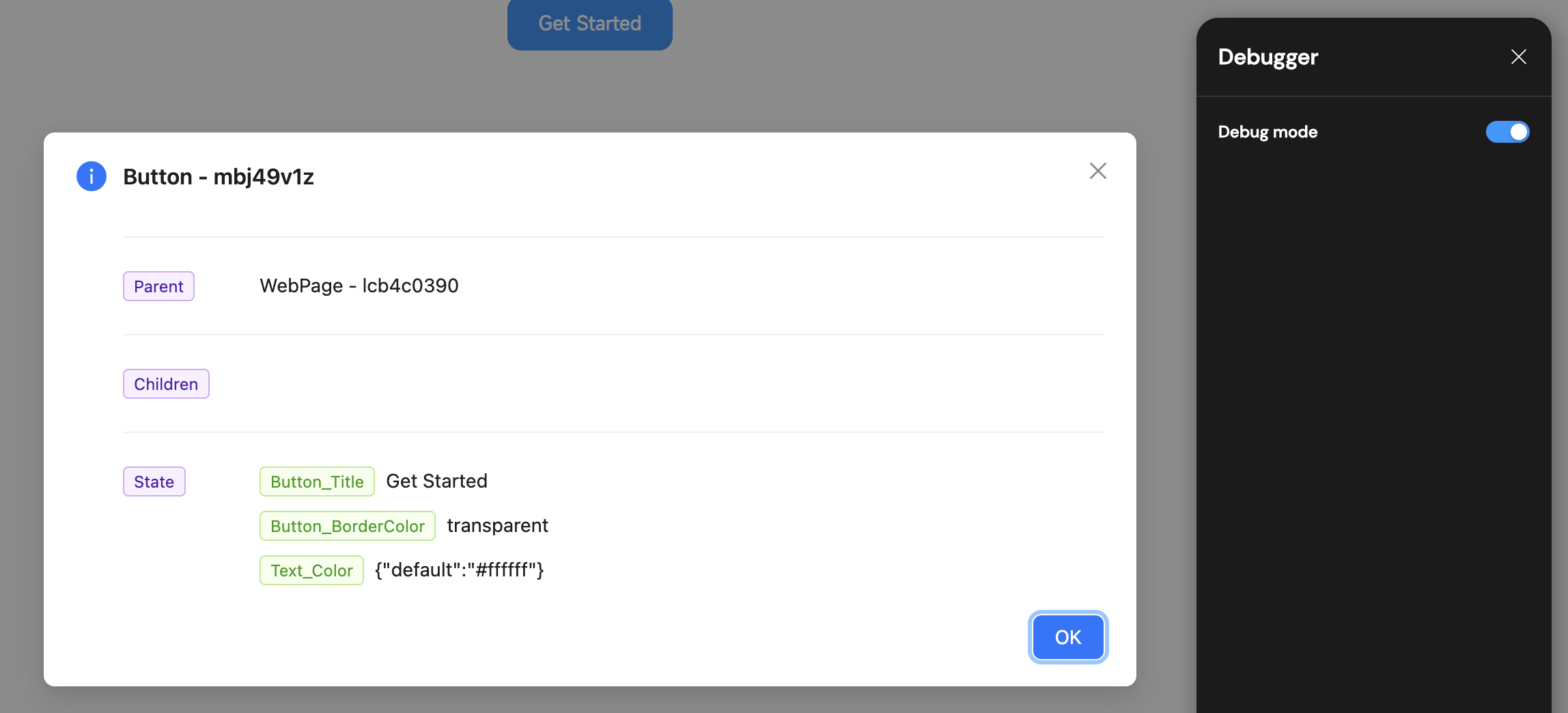
- Mirror now includes a Debug Mode, making it easy to inspect the data state of components (Mirror → Click the debugger icon → Enable Debug Mode).
- The text component supports rendering Markdown-formatted content.
- Added an option to enable or disable global horizontal and vertical scrollbars (Settings → Theme → Enable Scrollbar).
✨ Enhancements
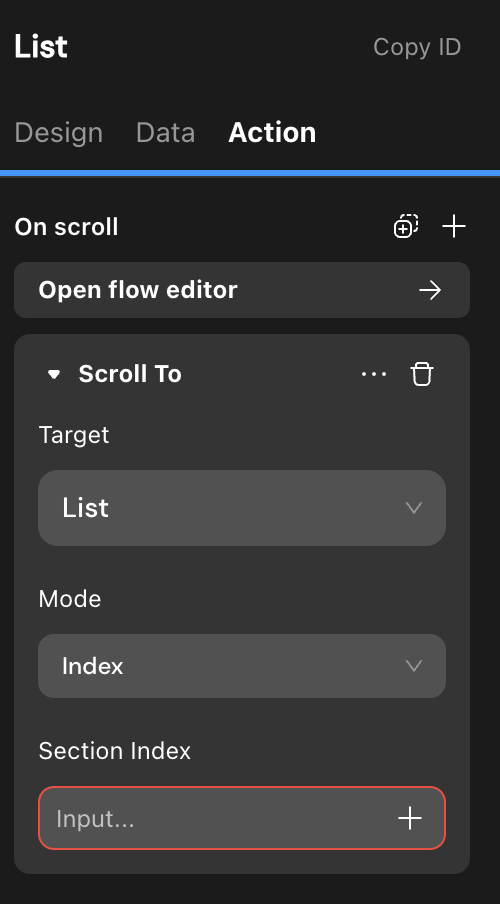
- Standardized list scrolling action.
- Improved field validation interactions in database operations.
- Refreshed the HTML component styles in the editor canvas.
- Reduced the minimum interval for scheduled jobs on pages to 1ms.
🐞 Bug Fixes
- Fixed issues with image arrays and image uploads after trigger configuration.
- Resolved mismatches between AI table structures and request payloads.
- Fixed bugs with email titles and lost diffs.
- Exposed
id,created_at, andupdated_atin GraphQL insert/update operations. - Fixed loading issues in AI debug mode.
- Improved project validation error location display.
- Handled non-object API response bodies correctly.
- Improved database manager selection and AI prompt input field usability.
- Adjusted payment confirmation dialogs and increased AI conversation turns from 30 to 1,000,000.
- Fixed image parameter binding in follow-up AI sessions.
- Ensured downloaded file names match original uploads.
- Fixed API call errors and runtime parsing results.
- Fixed maximum image count in image selector sidebar.
- Corrected gradient color display and bulk data addition with empty arrays.
- Added toggle to hide sidebar loading animation during async workflows.
- Fixed parameter configuration in audio playback actions.
- Resolved page navigation failures with date-formatted URL parameters in live preview.
- Fixed cross-project copy-paste interactions and file upload type filtering.
- Fixed broken AI assistant link in the editor.
- Fixed page padding display and AI status issues.
- Fixed image file size not changing after enabling compression in image selector.
- Resolved issues retrieving image ID and URL in AI prompts.
- Fixed loop after “refresh” due to “data fluctuation” in payment configuration activation.
- Improved multi-image input for AI and API calls with default values in custom workflows.
- Corrected AI database tool information.
- Fixed exceptions when editing filter conditions in table components.
- Resolved incomplete code block display in custom workflows.
- Fixed child component height setting when parent layout is top-to-bottom.
- Fixed opacity setting in image selector and issues with view height/width.
- Fixed absolute component positioning.
- Resolved GraphQL generation issues when filtering by boolean fields in the database.
v2.2.5 | April 23, 2025
🚀 New Features
- Data query and operations now support filtering by table fields.
- Lists now support Masonry layout.
- API requests now support setting a specific field as a unique ID.
- Expanded font weight range: Ultra-light and Ultra-bold added.
✨ Enhancements
- Optimized loading performance of avatars within the editor.
- Modified the display of consumption for AI debugging mode.
🐞 Bug Fixes
- Fixed an issue where API runtime parsing results were incorrect.
- Fixed an issue where lists were not displaying data.
- Fixed an issue where images were not displaying in the web project list.
- Fixed a 500 and 402 error when batch adding data with an empty array ([]).
- Fixed an issue with real-time preview errors.
- Fixed an issue where parameter configuration data for audio playback behavior on Zed would cause an error.
- Fixed an issue where the entry point for transferring project ownership in the free version was not displayed.
- Fixed an issue where selecting Chinese input in the API-Debug-body would delete the entered information.
- Fixed data inconsistency in action flows between latestSchema and lastDeployedSchema.
- Fixed an issue where the WebSocket (ws) did not automatically trigger upon opening a cloned project.
- Fixed an issue with the remaining execution count.
- Fixed an error that occurred when enabling “get more information” in AI tools.
- Fixed an issue where AI points displayed as 0 and data was incorrect for cloned projects.
- Fixed an issue with project server migration failure.
- Fixed an issue allowing a promo code to have multiple valid marketRewardRules.
- Fixed an issue where breakpoints for list column numbers were not working.
- Fixed an issue where AI token consumption did not stop even when negative.
- Fixed an issue where AI remained in a STREAMING state.
- Fixed an issue where file upload actions had no type filtering or improper type filter configuration.
- Fixed a UI abnormality with the QR code on the successful publishing page.
- Fixed an issue where the ss log interface failed and did not send pagers.
- Fixed an issue where the filter condition icon color for the “Update” action flow was incorrect.
- Fixed an issue where the official website project preview did not end after 30 minutes.
- Fixed an issue where the field selection dropdown in the field filter condition pop-up moved with the background.
- Fixed an issue with Actionflow execution failure.
- Fixed errors in documentation text.
- Fixed an issue with erratic copy-pasting behavior in AI configuration data binding.
- Fixed an error that occurred when AI Claude called tools.
- Fixed an issue where the web client of a multi-client project remained in preview mode.
- Fixed an issue where clicking filter in the database opened via a browser resulted in a black screen.
- Fixed an issue with the automatic deletion of partially created Stripe webhooks.
- Fixed recurring deployment failures, including too many Stripe endpoints and subsequent unknown reasons.
- Fixed an issue where data written in the schema did not update when the data source name changed.
- Fixed the reset project failed issue.
- Fixed an issue where preview generation for large web projects was highly problematic.
- Fixed an issue exposing duplicate key deployment errors.
- Fixed an issue where error messages lacked location information if an SSO configuration bound to an action was deleted.
- Fixed an issue where context.getSsoUserInfo() returned null after successful Facebook SSO.
- Fixed an issue where items were identified as fields instead of items when using local data as a list data source.
- Fixed an issue with real-time preview errors.
- Fixed the lack of mobile verification code registration and login behaviors on the web client.
- Fixed an issue where incomplete data package usage status caused user confusion.
- Fixed an issue where lists using a multi-select choice view as a data source could not display data in the list.
- Fixed issues with viewing and selecting relationship columns for 1-to-1 relationships in the database.
- Fixed a Ztype validation error when setting input component values.
- Fixed the Duplicate page fails issue.
- Fixed an issue in remote data deduplication where entering a non-database column field value would show it in the dropdown instead of failing the search because the field does not exist.
- Fixed an issue where default values for date type configurations in choice views were not taking effect.
- Fixed an execution error when callback output parameters used text/plain.
- Fixed an issue where Facebook SSO requests returned unexpected results and it was unclear if it was successful.
- Fixed an error when cloning multi-client projects.
- Fixed an issue where custom domains were not completely deleted.
- Fixed an issue where iOS video upload limits were ineffective.
- Fixed an issue where custom domains could still be deleted after a project downgrade.
- Fixed an issue where prices were not appearing for Stripe one-time payments.
- Fixed an issue where the image displayed in a pop-up image component was different from the requested image.
- Fixed an issue where the progress bar component’s default value could not retrieve the default value of an input component or page data.
- Fixed the missing “Professional Edition” tag for SSO.
- Fixed an issue where using a choice view in the “Search by Hospital” pop-up did not display data, while a list could.
- Fixed an issue where increasing the font size changed the line height multiplier.
- Fixed a diff validation abnormality that occurred when selecting all permissions for an account.
- Fixed an issue where AI streaming would freeze.
- Fixed an issue where the update for payment callbacks could be saved and the backend updated even if no filter was configured.
- Fixed an issue where adding a column in a custom view would redirect to the default account table instead of staying in the current view table.
- Fixed an issue with default values when switching a text input box to bigint.
- Fixed issues with Lottie front-end blocking SMS-related behaviors, affecting login and sending SMS verification codes on mobile phones.
- Fixed a bug in the project log service that caused an error after selecting a custom time.
- Fixed an issue where AI behaviors with non-streaming output in ZVM should ignore streaming output configurations.
- Fixed an editing abnormality with table component filter conditions on Zed.
- Fixed an issue where page data, if it was the result of AI streaming output, would accumulate after each session.
- Fixed an issue where inputting decimals was not supported when modifying latitude and longitude in the database.
- Fixed an issue with user feedback regarding abnormal data usage.
- Fixed an error when calling AI after project deployment.
- Fixed an issue where the Data Selector output did not change upon switching.
- Fixed an issue where clicking on fields in the filter for knowledge base data screening in AI would cause a black screen.
- Fixed an issue with default values for date/time types in choice views.
- Fixed an issue where selecting a formula method after selecting the result type in a formula would change the formula’s result type.
v2.2.4 | Apr 28, 2025
🚀 New Features
- Added cross-project copy-paste support for users with owner permissions (components, APIs, Actionflows, and AI agents)
- Added a function for extracting weekdays from date expressions
- Enabled AI to auto-fill tool names
- Enabled real-time sync in collaborative editing mode
- Blocked web crawlers via robots.txt for
caveandvilladomains
✨ Enhancements
- Improved the Mirror interface by allowing user interaction with mock input data
- Enhanced expand/collapse behavior for page structure with keyboard shortcuts
- Improved the project list in the personal dashboard by adding the “Server Upgrade Status” field
- Optimized performance for deeply nested list rendering and scrolling
- Unified system and custom LLM configurations for a more consistent model management experience
🐞 Bug Fixes
- Fixed password reset errors in Momen projects
- Fixed missing non-balance records in the transaction history
- Fixed incorrect context naming in AI database
- Fixed AI error:
Cannot invoke 'FieldDescription.getFields() - Fixed delayed updates when modifying properties in the right-hand panel
- Fixed missing gating logic in Actionflow conditional filters
- Fixed
JSON_EXTRACT_PATHformula error in Actionflow - Fixed deduplication failure in
get correct schemaforpendingActionFlow - Fixed default value hint not displaying in unbound data selectors
- Fixed JSON import failure on Momen landing page
- Fixed payment config being enabled in projects without payment functionality
- Fixed broken navigation on circular dependencies in page data sources
- Fixed missing
result datain async Actionflows within Ztype - Fixed failure in QR code generation when accessing list item values
- Fixed
interpreterSamplehang during Actionflow execution - Fixed database access failure in multi-client projects
- Fixed blank screen rendering in some web pages
- Fixed data display issue in list components inside popups
- Fixed font weight configuration typo (
700should bebold, notmedium) - Fixed lack of user feedback on AI tool invocation failures
- Fixed inconsistent character limits for all AI descriptions (standardized to 10,000)
- Fixed validation errors caused by stale data when switching popup actions
- Fixed select view default value failure when using conditions or formulas
- Fixed data presence in table component not rendering on frontend
- Fixed incorrect prompt about unconfigured pages during submission
- Fixed mismatch between negative AI Points display and database values
- Fixed multiple validation errors when previewing multi-client projects
- Fixed server 500 error in admin console
- Fixed validation error on variable removal from page scope
- Fixed broken routing to
select viewfrom other pages - Fixed diff issue when creating new data models
- Fixed sensitive information being exposed in Zeus front-end responses
- Fixed incorrect boolean evaluation of
string_lenin conditional containers - Fixed schema inconsistency after app cloning
- Fixed input value setting failure before popup opens
- Fixed calendar component sending continuous requests in console
- Fixed issue where AI execution success did not trigger
set_pagedata - Fixed publishing freeze in sub-client apps
- Fixed internal server error during project import
- Fixed crash when using
distinctwithcountin data queries - Fixed unclear error message when Stripe refund failed due to insufficient balance
v2.2.3 | Mar 28, 2025
🚀 New Features
- Components support visible/invisible at various breakpoints.
- Support for retrieving the user’s permission role list on the frontend page.
- Static SVG supports direct embedding into HTML.
- Agent configuration supports Conditional and Formula.
- Launched our new Education Program: Students and educators can now enjoy 50% off on all plans
🐞 Bug Fixes
- Fixed the issue where new API added in the List component could not be used as a Data source.
- Fixed the issue of abnormal cursor jumping in the input box.
- Fixed the issue where constraint names could be the same as field names.
- Fixed the issue of abnormal scrolling in the Conditional Editor.
- Fixed the issue where streaming Output to page variables in AI Continue Conversation behavior displayed incorrectly on the page.
- Fixed the issue of UI damage in Callback parameter configuration.
- Fixed the issue where logged-in user data could not be used in AI configuration.
- Fixed the issue where List item width did not have % configuration.
- Fixed the issue where cloning any Project would report an error.
- Fixed the issue of text disorder in DeepSeek thinking process.
- Fixed the issue where backend deployment errors were not reported to the group.
- Fixed the issue where page data configured as List did not support Remove View.
- Fixed the issue where the inclusion judgment of date type fields did not take effect.
- Fixed the issue where Scheduled triggers continued to execute after Actionflow deletion.
- Fixed the issue where components copied within List items could not be pasted onto the page.
- Fixed the issue where the create button should not be clickable during data cloning.
- Fixed the issue where updating table data in Actionflow could not set the date to Null.
v2.2.2 | Mar 13, 2025
🚀 New Features
- File upload action: support for limiting file size.
- SEO: support for Canonical URL
✨ Enhancements
- Advanced filtering in permissions supports using Actionflows or AI inputs as conditions for judgment.
- AI prompts support binding constant data, such as current date and time.
- Structured output of AI supports drag-and-drop order adjustment.
- Add a prompt when the source of an AI tool is deleted.
🐞 Bug Fixes
- Fix issues such as new diffs failing to access custom domains.
- Fix the issue in conditional containers where, under focus mode, when conditions are configured, the text and background colors are the same, making them illegible.
- Fix the issue where context.log is not working in code blocks within custom behavior flows.
- Fix the issue where permissions are fully open by default.
- Fix the issue in multi-client upload verification where clicking the view icon redirects to an incorrect link.
- Fix the issue where an error occurs if two code block nodes under the same branch of a behavior flow declare the same variable.
- Fix the issue in multi-client environments where sub-clients may report errors indicating that large models cannot be recognized.
- Fix the issue where array fields in custom objects cannot be bound to multi-select selection views.
- Fix the issue where defining input parameters with the same name in different code blocks causes an error.
v2.2.1 | Feb 27, 2025
🚀 New Features
- Free Trial for Templates: Users can directly try advanced version templates for free for three days.
- Coupon Redemption: Users can redeem coupons directly on the My wallet page using a redemption code.
- Dynamic List Component: Automatically calculates and adjusts the number of columns based on the configured width for a responsive display.
✨ Enhancements
- AI Configuration Interaction Updates:
- When an invocation error occurs, specific error details are now displayed.
- “APP Token” renamed to “AI points,” with input and output calculations separated.
- Added a Point Calculator to easily calculate consumption for different models.
- Field description character limit increased from 100 to 10,000 characters.
- Tool names can now be configured.
🐞 Bug Fixes
- Fixed an issue where the page icon for custom domains couldn’t be modified.
- Fixed an issue where database trigger behavior couldn’t retrieve associated data from input parameters.
- Fixed an issue where the right sidebar of the conditional container couldn’t rename items.
- Fixed an issue where data concatenation wasn’t working in database trigger conditions.
- Fixed an issue where no prompt was shown when the tool source of an Agent was deleted.
- Fixed an issue where copying global data caused the project to fail to open.
- Fixed an issue where repeated prompts appeared after an import failure.
- Fixed an issue with gradient color display.
- Fixed an issue where the default value of an API in the behavior flow was not working.
v2.1.3 | Jan 23, 2025
🚀 New Features
- Components support visible/invisible at various breakpoints.
- Support for retrieving the user’s permission role list on the frontend page.
- Static SVG supports direct embedding into HTML.
- Agent configuration supports Conditional and Formula.
- Launched our new Education Program: Students and educators can now enjoy 50% off on all plans
🐞 Bug Fixes
- Fixed the issue where new API added in the List component could not be used as a Data source.
- Fixed the issue of abnormal cursor jumping in the input box.
- Fixed the issue where constraint names could be the same as field names.
- Fixed the issue of abnormal scrolling in the Conditional Editor.
- Fixed the issue where streaming Output to page variables in AI Continue Conversation behavior displayed incorrectly on the page.
- Fixed the issue of UI damage in Callback parameter configuration.
- Fixed the issue where logged-in user data could not be used in AI configuration.
- Fixed the issue where List item width did not have % configuration.
- Fixed the issue where cloning any Project would report an error.
- Fixed the issue of text disorder in DeepSeek thinking process.
- Fixed the issue where backend deployment errors were not reported to the group.
- Fixed the issue where page data configured as List did not support Remove View.
- Fixed the issue where the inclusion judgment of date type fields did not take effect.
- Fixed the issue where Scheduled triggers continued to execute after Actionflow deletion.
- Fixed the issue where components copied within List items could not be pasted onto the page.
- Fixed the issue where the create button should not be clickable during data cloning.
- Fixed the issue where updating table data in Actionflow could not set the date to Null.
Last updated on