Extract to Actionflow
When an Actionflow grows long, you can move a run of its nodes into a new Actionflow. Momen works out the new Actionflow’s inputs and outputs from the data those nodes read and produce, and leaves a Run Actionflow node in their place that calls it. The original Actionflow returns the same results before and after the extraction.
If you are new to Actionflow inputs, outputs, and nodes, read Build Actionflows first.
Use cases
- A run of nodes forms one step on its own, such as “calculate the order total” or “check stock”. Moving it out makes the main flow easier to read.
- Several Actionflows contain the same logic. Extract it once and call it from the others with a Run Actionflow node.
- You want a new Actionflow based on existing nodes without changing the original.
Steps
Select the nodes
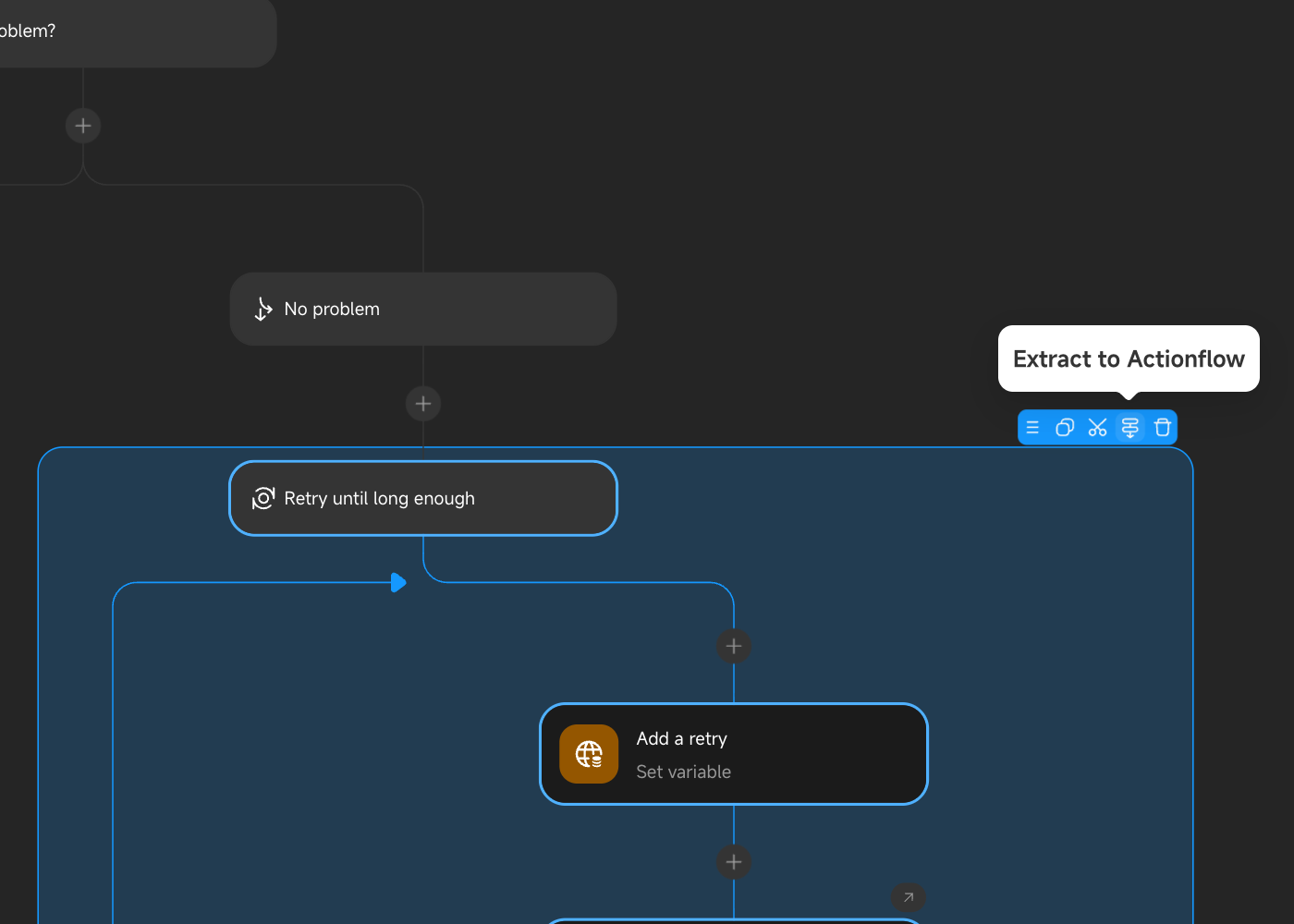
Select the nodes to extract on the Actionflow canvas, then start the extraction in either way:
- Drag a selection box around the nodes and click Extract to Actionflow on the selection toolbar.
- Open the context menu on a node and choose Extract to Actionflow.
Selecting a Condition, For each, or While loop node takes every node inside it along. See Selection rules for what a selection must satisfy.
Review the extraction settings
The Extract to Actionflow dialog shows the following settings:
- Name: The new Actionflow’s name. Defaults to “original Actionflow name - fragment”.
- Group: The group the new Actionflow belongs to. Defaults to the original Actionflow’s group.
- Replace the selected nodes with a Run Actionflow node: Checked by default. The selected nodes move out and a Run Actionflow node calling the new Actionflow takes their place. Uncheck it to create the new Actionflow only and leave the original unchanged.
Expand Impact to preview what the extraction will change:
| Section | Description |
|---|---|
| Inputs | External data the selected nodes reference. Each item becomes an input of the new Actionflow. |
| Output | Results of the selected nodes that later nodes reference. They become the new Actionflow’s output. |
| Nodes added automatically | Receive variables and Write back variables nodes added to keep results unchanged. They appear only when Actionflow variables are involved. |
| Types made public | Private types that must become object types to pass between Actionflows. |
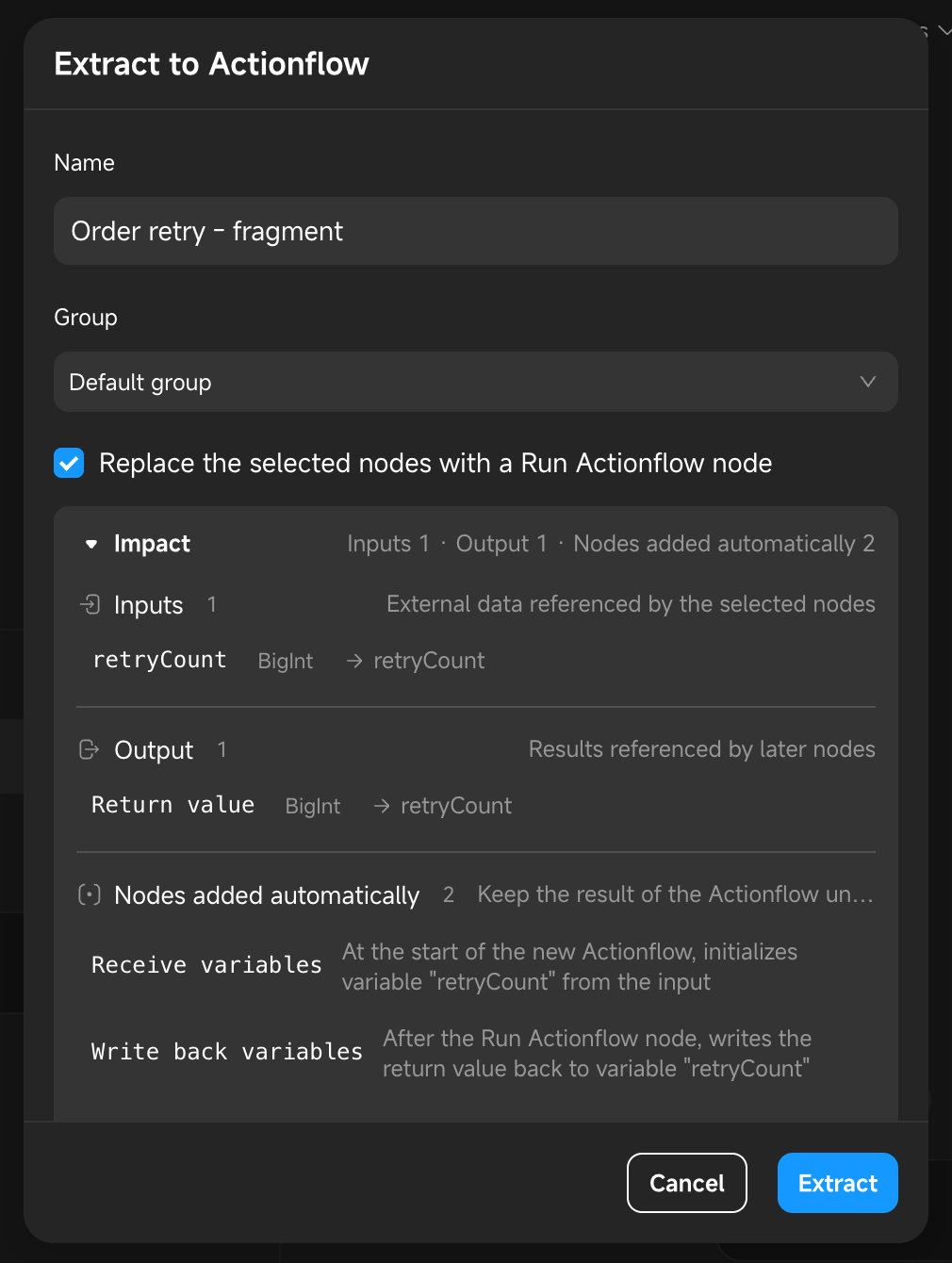
If the selection cannot be extracted, the dialog shows The selected nodes cannot be extracted with the reason.
Extract
Click Extract. After the extraction:
- A new Actionflow is added to the project. It holds the selected nodes and the inputs and output derived from their data.
- If you kept the replacement checked, a Run Actionflow node stands where the nodes were, with its inputs already bound to the data they used to read. Later nodes read their results from this node instead.
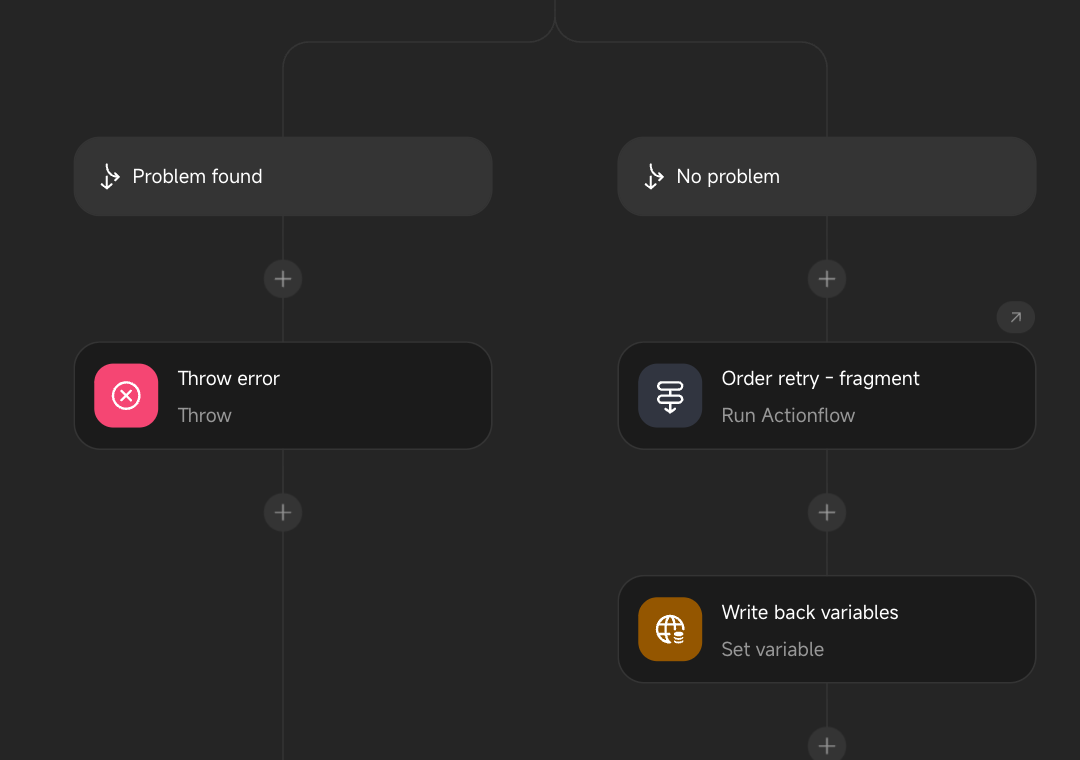
To roll back, undo the extraction. Both Actionflows return to how they were before it.
How the new Actionflow is configured
The new Actionflow keeps the original Actionflow’s execution mode (synchronous or asynchronous) and timeout. It has no Triggers and is only called through Run Actionflow nodes. Its permissions are the same as for any newly created Actionflow; adjust them under Settings → Permissions.
Inputs
Each of the following, when referenced by the selected nodes, becomes an input of the new Actionflow, and the matching input on the Run Actionflow node is bound to the original data:
- Results of earlier nodes.
- Inputs of the original Actionflow.
- Actionflow variables of the original Actionflow that the selected nodes only read.
- The current item and index of the enclosing For each loop.
Inputs are named after their source, such as the node or loop name. If a node’s whole result cannot be an input (for example, an object without a type name), only the fields in use are passed in, one input per field.
When the reference is an aggregate of a query result, such as a count, sum, or average, the aggregated value is passed in rather than the whole list.
Output
Results of the selected nodes that later nodes reference become the new Actionflow’s output:
- If one result is referenced, it is returned directly.
- If several results are referenced, they are returned together as one object, one field per result.
Later nodes then read from:
Actionflow data → Run Actionflow node name → Field name
As with inputs, a result that cannot be returned as a whole is returned field by field, and a referenced aggregate is returned as the aggregated value.
If no result is referenced later, the new Actionflow has no output.
Actionflow variables
An Actionflow variable belongs to the Actionflow that declares it, so the new Actionflow cannot change the original’s variables directly. Each variable is handled according to how it is used:
| How the variable is used | What happens |
|---|---|
| The selected nodes only read it | It is passed in as a regular input. |
| The selected nodes change it, and nothing outside the selection uses it | It moves into the new Actionflow with the nodes and is removed from the original. |
| The selected nodes change it, and nodes outside the selection still use it | The new Actionflow declares a variable of the same name, and Receive variables and Write back variables nodes are added, as described below. |
Both Receive variables and Write back variables are Set variable nodes:
- Receive variables: Placed at the start of the new Actionflow. It sets the variable from an input that carries the variable’s current value, so nodes in the new Actionflow read the same value as before.
- Write back variables: Placed after the Run Actionflow node in the original Actionflow. It writes the returned value back to the original variable, so later nodes read the changed value.
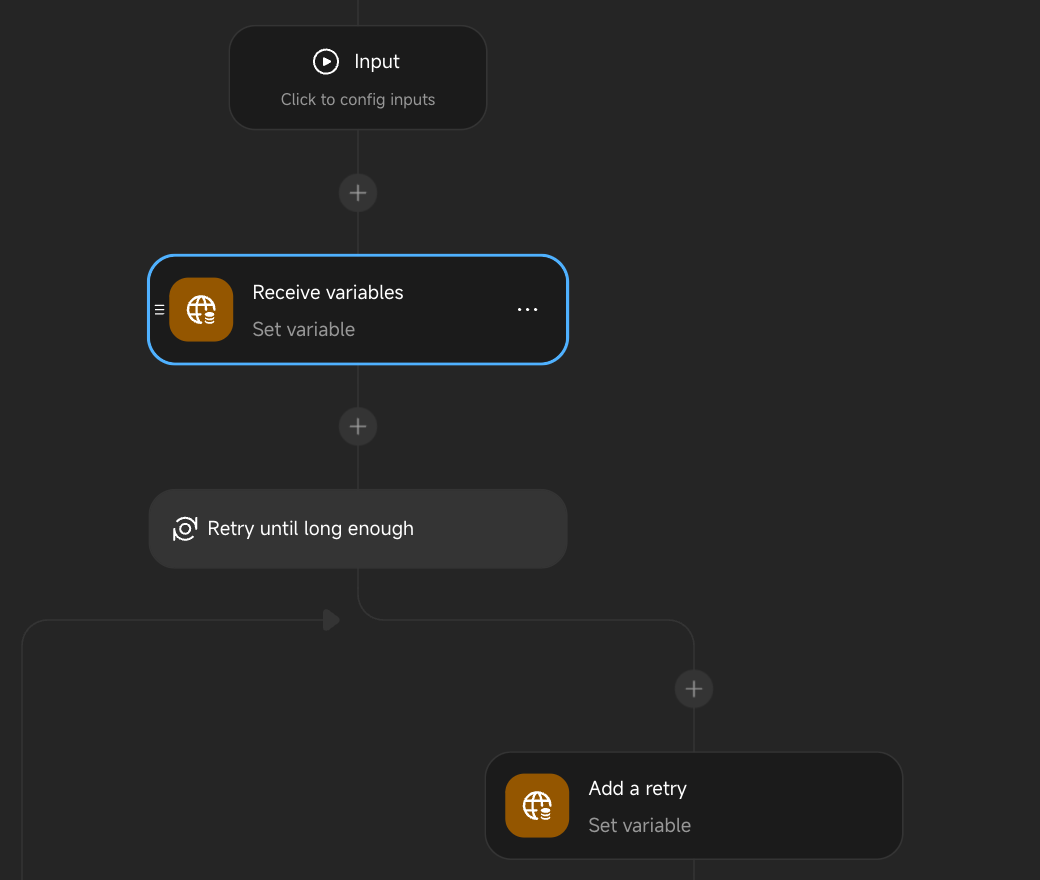
Receive variables is added even when the selected nodes never read the variable. Suppose the variable is only changed inside one branch: if the new Actionflow did not start from the current value, Write back variables would reset it to its default whenever that branch is skipped.
If the selected nodes sit inside a For each or While loop whose loop node is not selected, every Actionflow variable they change is handled the third way, even when nothing outside the loop uses it. The new Actionflow is called once per iteration, so otherwise the variable would start from its default on every iteration and could not carry a value across iterations.
Private types
Data such as API responses uses private types, which only work where they are defined and cannot be the input or output of another Actionflow. When the extraction meets such a type, it turns the type into an object type and lists it under Impact → Types made public:
- The type ID stays the same, so existing bindings keep working.
- It is named “API name response”. Types nested in the response are named “API name response / field path”, and types from other sources are named “node name result”. Duplicate names get a suffix such as ” (2)”.
Selection rules
A selection can only be extracted when it meets these conditions:
- One contiguous run at one level: The selected nodes must follow each other at the same level, on the main flow, inside one branch, or inside one loop. They cannot span levels or leave gaps.
- No Input or Output nodes: Input and Output nodes cannot be extracted. A selected Condition with a branch that ends in an Output node cannot be extracted either: in the new Actionflow, that node would only end the new Actionflow, not the original one.
- Whole conditions and loops: A single branch of a Condition cannot be extracted on its own. Select the nodes inside it, or select the whole Condition.
- Break with its loop: If the selection contains a Break node, the loop it belongs to must be selected too.
- Called Actionflow still exists: If a selected Run Actionflow node calls an Actionflow that has been deleted, Extract to Actionflow is not shown.
Nodes cannot be extracted in the debug view.
The dialog also reports a selection as not extractable when:
- Data that the selected nodes reference has a type that cannot be an Actionflow input.
- A result that later nodes reference, or an Actionflow variable that must be written back, has a type that cannot be an Actionflow output.
Create the new Actionflow only
When Replace the selected nodes with a Run Actionflow node is unchecked:
- Only the new Actionflow is created. The original Actionflow’s nodes, bindings, and Actionflow variables stay unchanged, and no Write back variables node is added.
- The new Actionflow’s inputs, output, Receive variables node, and public types are the same as when the option is checked.
Use this to build a reusable Actionflow from existing logic and switch the original call sites over later.